Broken Affiliate Links on YouTube: The Complete Guide to Finding, Fixing, and Preventing Lost Commissions
Broken Affiliate Links on YouTube: The Complete Guide to Finding, Fixing, and Preventing Lost Commissions
The bottom line: Broken affiliate links cost the average YouTube creator with 100K subscribers roughly $2,400 per month in lost commissions. Links break silently from discontinued products, URL changes, Amazon listing removals, and affiliate program restructuring — and YouTube never tells you. About 15-20% of affiliate links develop issues within a year. Youfiliate is a smart link platform built specifically for this problem: create one branded short URL (youfil.to/your-link) per product, use it across every video, update the destination in one place when something changes, and let 24/7 health monitoring catch breaks before they cost you money. Free tier covers 10 links; paid plans start at $9/month flat rate.
Quick answer for new readers: A “smart link” is a single branded short URL that you control, with the affiliate destination managed in a dashboard rather than hardcoded in your video descriptions. When a product gets discontinued, you change one URL and every video using that link is instantly fixed. Youfiliate adds geo-targeting (UK viewers go to amazon.co.uk, not amazon.com) and deep linking (mobile clicks open the Amazon app for higher conversion) on top. Start free at Youfiliate.com — 3 smart links, no card required.
If you earn money through affiliate links in your YouTube video descriptions, there is a near certainty that some of those links are broken right now. Products get discontinued, Amazon listings vanish, merchants restructure their URLs, and affiliate programs switch networks. Every day those dead links sit in your descriptions, viewers click through to error pages and you earn nothing.
The worst part: YouTube does not notify you when this happens. Your videos keep getting views, your viewers keep clicking, and you keep losing commissions in silence.
This guide covers everything you need to know — why affiliate links break, how much they cost you, how to find the broken ones across your channel, the specific Amazon out-of-stock problem, and how to fix and prevent breakage going forward.
Why Do YouTube Affiliate Links Break?
Affiliate links are not permanent. Here are the most common reasons they stop working:
Products get discontinued or go permanently out of stock. This is the single biggest cause, especially for Amazon affiliates. You review a product, add your affiliate link, and months later the manufacturer discontinues it. The listing either shows “Currently unavailable” or disappears entirely. Every click on that link earns you nothing.
Merchants change their URL structure. When a company rebrands, migrates their website, or restructures product pages, every old URL breaks overnight. If you linked to example.com/products/widget-v2 and they moved everything to example.com/shop/widget, your link is dead.
Affiliate programs shut down or switch networks. Companies move between affiliate networks (ShareASale, CJ, Impact, etc.) more often than most creators realize. When they do, every link tied to the old network stops tracking — even if the product page still loads. You send traffic but get zero credit for sales.
YouTube truncates the link itself. YouTube sometimes fails to hyperlink the full URL in descriptions, especially when the link contains special characters like ? or & that are common in affiliate tracking parameters. The link looks correct in your description, but the affiliate tag gets cut off when a viewer clicks it. You send people to the right product but your tag is missing — so you don’t get paid. A branded short URL like youfil.to/sony-a7iv sidesteps this entirely — no special characters, no truncation risk.
Redirect services expire. If you shortened affiliate links with a service like Bitly or a custom redirector, those intermediate links can break independently of the actual product page. The product is fine, but your redirect is dead.
How Much Do Broken Affiliate Links Cost YouTube Creators?
The losses add up faster than most creators expect. Our data shows that the average creator with 100K subscribers loses approximately $2,400 per month from broken affiliate links. For larger channels, the numbers are significantly higher.
Here is a concrete example. A channel with 200 videos, each averaging a few thousand views per month from long-tail search traffic. If just 5 of those videos have broken affiliate links getting a combined 10,000 views per month:
- 10,000 views x 1% description click-through rate = 100 clicks
- 100 clicks x 3% conversion rate = 3 lost sales
- 3 sales x $20 average commission = $60/month from just that cluster
Scale that across an entire channel and the annual losses reach thousands of dollars.
Several factors make this worse than it looks on paper:
- Long-tail views compound the damage. Older videos keep generating views and clicks for years. If those links are broken, every single view is a missed opportunity.
- Detection takes weeks. It takes an average of 3 weeks for creators to notice a broken link — if they notice at all. Many broken links are never discovered.
- The cookie window dies too. Amazon Associates uses a 24-hour cookie. When a viewer clicks a working link, anything they buy on Amazon in the next 24 hours earns you a commission. A broken link kills that entire window — you lose credit not just for the linked product, but for everything the viewer would have bought.
- International viewers are a hidden loss. If you only link to amazon.com, viewers in the UK, Germany, or Japan land on the wrong store. Your affiliate cookie does not apply, and you lose the commission. Setting up international Amazon Associates accounts and using geo-targeted smart links route each viewer to their local store automatically.
- Revenue drops of 35% are typical for creators who never monitor their link health.
The real damage is that these losses are invisible. Your view counts look normal. Your analytics show nothing wrong. You just quietly earn less than you should.
Common Causes: The Amazon Out-of-Stock Problem
Amazon deserves its own section because it is the most common affiliate program for YouTube creators — and Amazon links break constantly. Roughly 15-20% of Amazon affiliate links develop issues over time.
Why Amazon Links Break So Often
Amazon’s catalog is massive and in constant flux. Products disappear for several reasons:
Discontinued by the manufacturer. The company stopped making the product. The listing may linger showing “Currently unavailable” before eventually being removed.
Seller left Amazon. Third-party sellers come and go. If the only seller for a product leaves the platform, the listing goes dead even though the product exists elsewhere.
Listing removed for policy violations. Amazon regularly pulls listings for misleading descriptions, fake reviews, or compliance issues. Your link goes to a dead page.
Listing merged or replaced. Amazon sometimes merges duplicate listings or replaces older product pages with newer versions. Your old link might redirect to a completely different product, or it might 404.
Seasonal or limited inventory. Some products are only available during certain times of year. Your link works in November but breaks in March.
For a creator with 100 Amazon links across their video descriptions, that 15-20% failure rate means 15-20 links silently failing right now.
What Viewers See When They Click a Dead Amazon Link
When a viewer clicks your Amazon affiliate link and the product is unavailable, they encounter one of these scenarios:
- “Currently unavailable” — the most common outcome. The page exists but there is nothing to buy. Amazon may show alternative products, but your affiliate tag is attached to the original listing, not the alternatives.
- The “dog page” 404 — Amazon’s error page with employee dog photos. The listing was completely removed.
- A redirect to a different product — the viewer sees something that does not match what you described in your video. This erodes trust even if the link technically loads.
- A redirect to the Amazon homepage — your viewer lands on amazon.com with no product in sight. Your cookie is set but the chance of a purchase drops dramatically.
None of these earn you the commission you expected. And critically, none of them generate the kind of browsing behavior that makes Amazon’s 24-hour cookie valuable. A viewer who lands on an “unavailable” page usually leaves Amazon entirely.
Does Amazon Notify You When Products Go Out of Stock?
No. Amazon does not notify affiliate partners when individual product listings become unavailable. The link simply stops converting. There is no email, no dashboard alert, nothing. This is why automated monitoring is essential for any creator with more than a handful of Amazon links.
How to Find Broken Affiliate Links Across Your Channel
There are three approaches, ranging from fully manual to fully automated.
Manual Checking
Open each of your videos on YouTube (the published page, not YouTube Studio) and click every affiliate link. For each link, verify:
- Does the page load without errors?
- Is the product actually available for purchase?
- Does the URL in your browser still contain your affiliate tag (e.g.,
tag=yourid-20for Amazon)? - Is the product the same one you recommended in the video?
If any answer is no, the link needs to be fixed.
This works for small channels but becomes impractical fast. A channel with 100 videos averaging 3 affiliate links each means 300 links to check — and you need to repeat this regularly since links break over time.
Semi-Automated with a Spreadsheet
A more efficient version: export your video descriptions (request your data from Google Takeout, which includes all YouTube data), extract the URLs, and run them through a bulk link checker like Dr. Link Check or Dead Link Checker.
This saves time on the checking step, but extracting links from descriptions is still tedious. And standard link checkers miss “soft 404s” — pages that return a 200 status code but show “Currently unavailable.” The checker reports the link as working even though the product cannot be purchased.
Amazon Associates also provides a basic Link Checker in their Associates Central dashboard. You can paste a URL to verify your tag is properly formatted. However, it only checks tag validity — it does not tell you if the product is available, and it cannot scan your YouTube descriptions automatically.
Smart Links with Built-in Health Monitoring
The most practical approach for any channel with more than a few dozen videos is smart links with built-in health monitoring. Instead of pasting raw affiliate URLs in your descriptions, you create a smart link (e.g., youfil.to/my-camera) that redirects to the affiliate destination. The platform monitors every destination 24/7 and alerts you when something breaks, with your highest-traffic links flagged first.
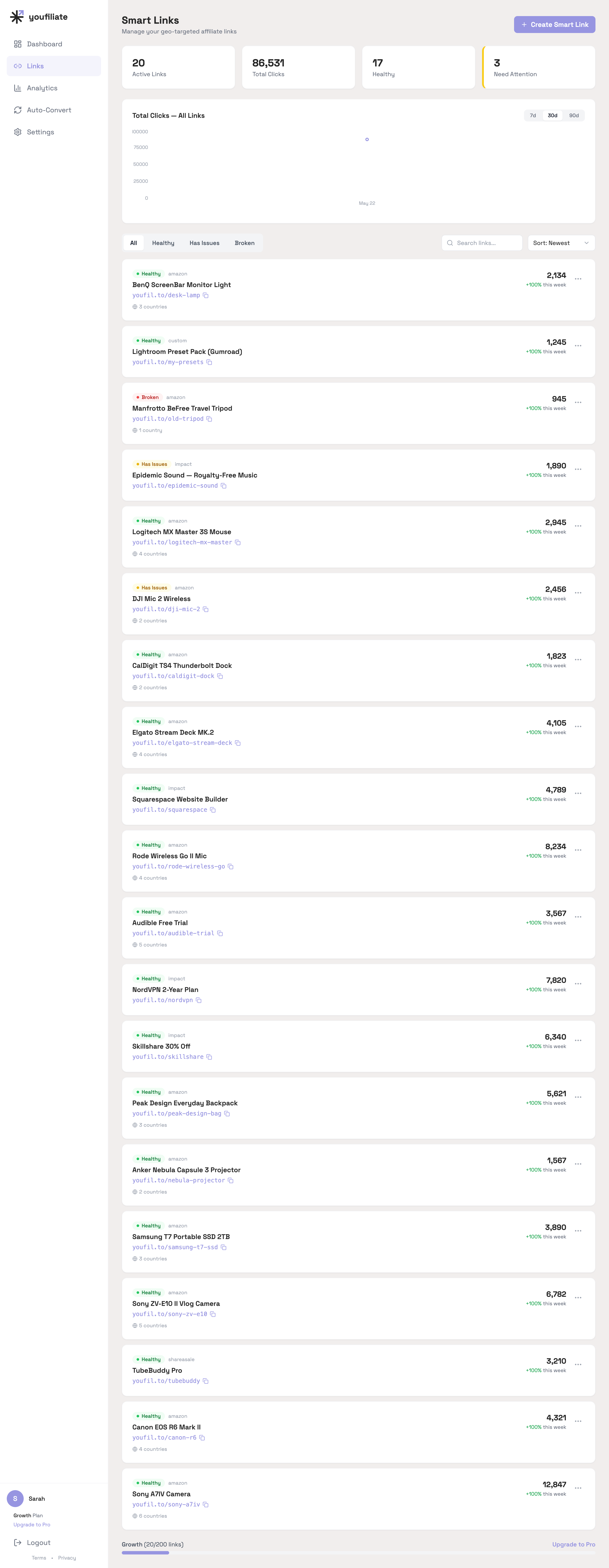
What active health monitoring looks like in practice: a real catalog of 20 smart links with one Broken link (Manfrotto tripod hit a 404), two Has Issues links (DJI Mic 2 and Epidemic Sound — typically Amazon “Currently unavailable” pages or slow-responding affiliate redirects), and the rest Healthy. Without monitoring, the broken Manfrotto link could sit dead for weeks across however many videos used it.
Youfiliate is a smart links platform built for creators. Paste any affiliate link — Amazon, ShareASale, Impact, anything — and get back a branded short URL with health monitoring, geo-targeting (so UK viewers land on amazon.co.uk instead of amazon.com), and deep linking (opening merchant apps on mobile for higher conversions). When a product gets discontinued, you update the smart link destination once — every video, bio page, or blog post using that link is instantly fixed.
The advantage is not just catching breaks. It is that fixing them takes seconds instead of hours editing video descriptions one by one.
For the full smart links picture, see the smart links guide.
How to Fix Broken Affiliate Links on YouTube
Once you have identified broken links, here is how to handle each scenario:
The Product Is Still Available but the URL Changed
Find the current product page, generate a fresh affiliate link through your affiliate program dashboard (Amazon Associates, ShareASale, etc.), and update the description in YouTube Studio.
The Product Is Permanently Discontinued
Find the closest current alternative — the newer model, a competing brand with similar reviews and pricing. Generate an affiliate link for the replacement and update your description. Consider adding a note at the top: “Updated: Some product links below have been updated to current models.” This signals that you maintain your content and builds trust.
The Affiliate Program Changed Networks
Sign up for the new affiliate program, generate fresh links, and replace old ones across all affected videos.
YouTube Truncated Your Link
This usually happens with URLs containing ? characters. The fix is to add a / before the ? in your URL. For example, change https://example.com/product?tag=yourid-20 to https://example.com/product/?tag=yourid-20. Alternatively, use a smart link to avoid the issue entirely.
Your Redirect Service Is Broken
Either fix the redirect at the source, or replace the shortened link with a direct affiliate URL — or better yet, a smart link you control.
Updating Descriptions in Bulk
YouTube Studio does not offer a built-in way to bulk edit video descriptions. You have to open each video individually and make the change. For large-scale updates, you can use the YouTube Data API to programmatically update descriptions, but this requires technical knowledge.
Smart links fundamentally change this equation. If you used youfil.to/my-camera in 50 video descriptions, updating the destination behind that one smart link fixes all 50 videos instantly. No description edits at all. Youfiliate also offers a YouTube auto-convert feature to bulk-convert existing affiliate links to smart links in one click.
How to Prevent Broken Affiliate Links Going Forward
Finding and fixing broken links is reactive. These strategies keep links healthy over time:
Use smart links for every affiliate URL. This is the single most effective prevention strategy. When your descriptions contain smart links, a broken destination is a one-step fix. Smart links also eliminate YouTube URL truncation issues since the URLs are short and clean.
Audit your top-performing videos monthly. If you are not using smart links with monitoring, do a manual spot-check of your top 20 videos sorted by views every month at minimum.
Prioritize by traffic. Not all broken links are equal. A broken link on a video getting 50,000 views per month is far more urgent than one on a video getting 50. Focus your time where the revenue impact is highest.
Use consistent link formats. Pick one approach — direct links, a link shortener, or smart links — and stick with it. Consistency makes finding and updating links faster. Build this into your YouTube description template so every new video starts with the right format.
Keep a record of your links. Maintain a spreadsheet mapping each video to the affiliate links it contains. This makes it faster to identify which videos need updating when a product gets discontinued.
Avoid generic link shorteners you do not control. If a third-party shortener goes down, every link you created with it breaks simultaneously. Smart links from a platform like Youfiliate are branded URLs (youfil.to/your-link) backed by monitoring, geo-targeting, and a dashboard where you control everything.
For Amazon specifically: favor products with multiple sellers. Products with many sellers are less likely to go completely unavailable. If you are choosing between two similar products to recommend and one has 10 sellers while the other has 1, the multi-seller option is a safer long-term bet.
Do not rely solely on Amazon. Higher-paying affiliate programs exist for many of the same products — Amazon’s commission rates range from just 1-4% depending on category. Diversifying across Impact, ShareASale, CJ, and direct merchant programs (each with their own commission structures) protects you when any single program restructures.
Frequently Asked Questions
How much money do broken affiliate links cost per month?
The average creator with 100K subscribers loses around $2,400 per month from broken affiliate links. Smaller channels still lose hundreds of dollars annually because broken links on older, long-tail videos accumulate over time. The losses are invisible — your view counts and analytics look normal while commissions silently disappear.
Why do YouTube affiliate links stop working?
The most common causes are product discontinuations, merchant URL restructuring, affiliate programs switching networks, YouTube truncating URLs with special characters like ?, Amazon listing removals, and expired redirect services. Any of these can break a link without warning, and YouTube never notifies you.
How often do affiliate links break on YouTube?
Industry data suggests 15-20% of affiliate links develop issues within a year due to product changes, URL restructuring, and program updates. The longer a video has been published, the more likely its links have broken. Channels that do not monitor their links typically have 15-20% broken at any given time.
Does YouTube notify you when affiliate links in your descriptions break?
No. YouTube does not monitor or report on links in your video descriptions. Your videos continue getting views, viewers continue clicking, and you earn nothing from those clicks until you discover and fix the problem yourself.
How do I find broken affiliate links in my YouTube descriptions?
You can check manually by clicking each link from your published video page (not YouTube Studio), use a spreadsheet approach by exporting descriptions via Google Takeout and running URLs through a bulk link checker, or use a smart links platform like Youfiliate where health monitoring is built in and every destination is checked 24/7.
Can I bulk edit YouTube video descriptions to fix broken links?
YouTube Studio does not offer bulk editing for descriptions. You must open each video individually and update the link. Smart links solve this — if you used one smart link in 50 descriptions, updating the destination behind that link fixes all 50 videos instantly. For updates without smart links, the YouTube Data API allows programmatic description edits.
What is the fastest way to fix a broken affiliate link on YouTube?
If you are using smart links, update the destination URL behind your smart link — every video using that link is fixed immediately with no description edits. Without smart links, open YouTube Studio, navigate to the affected video, click “Edit,” and replace the URL with a fresh affiliate link from the merchant’s dashboard.
What happens when an Amazon affiliate link points to an out-of-stock product?
The viewer typically lands on a page showing “Currently unavailable” with no purchase option. You lose the commission on that product and you also lose Amazon’s 24-hour cookie window — anything the viewer would have bought on Amazon in the next 24 hours no longer earns you a commission. Viewers who hit unavailable pages usually leave Amazon entirely.
Does Amazon notify you when a linked product goes out of stock?
No. Amazon does not notify affiliate partners when individual product listings become unavailable. The link simply stops converting. There is no email, no dashboard alert, nothing. This is why proactive monitoring is essential.
How do I know if YouTube truncated my affiliate link?
Click the link from the published video (not YouTube Studio). If the URL in your browser is shorter than what you pasted — particularly if it is missing the ?tag=yourid-20 portion — YouTube truncated it. This is common with long URLs containing special characters. Adding a / before the ? fixes the issue.
What is the difference between a 404 and a soft 404 for affiliate links?
A 404 means the page does not exist — the server returns an error. A soft 404 is when the server returns a 200 (success) code but the page shows “Currently unavailable” or “product not found.” Soft 404s are harder to detect because generic link checkers see the 200 status and report the link as working, even though the product cannot be purchased.
Can broken affiliate links hurt my YouTube channel or affiliate account?
Broken links do not affect your video’s search ranking, recommendations, or algorithmic performance on YouTube. However, they reduce your conversion rate, which can indirectly affect your standing with affiliate programs. Amazon Associates requires at least 3 qualifying sales within 180 days for new accounts — broken links make hitting that threshold harder.
Do broken affiliate links affect all programs or just Amazon?
All programs. Amazon links break when products get discontinued or sellers leave. ShareASale and Impact links break when merchants restructure websites or leave the network. Direct brand program links break when companies rebrand or change platforms. No affiliate program is immune to link rot.
How long does it take to notice a broken affiliate link without monitoring?
About 3 weeks on average — and many are never discovered at all. Creators typically only find broken links when a viewer complains in the comments, which happens rarely. Without automated monitoring, broken links accumulate silently over months and years.
Can broken affiliate links hurt my relationship with viewers?
Yes. Viewers who click a link expecting a product and land on a dead page lose trust in your recommendations. This reduces future click-through rates across all your links, not just the broken one. Maintaining working links is part of maintaining your credibility.
How many broken affiliate links does the average YouTube channel have?
Channels that do not actively monitor typically have 15-20% of their affiliate links broken at any given time. For a channel with 100 videos averaging 3 affiliate links each, that is roughly 45-60 broken links. The percentage increases with channel age.
Is there a free way to monitor affiliate links?
Manual checking is free but impractical at scale. Youfiliate’s free tier includes 3 smart links with unlimited clicks and full health monitoring — enough to protect your highest-traffic affiliate links at no cost. Paid plans start at $9/month with geo-targeting, deep linking, click analytics, and 24/7 monitoring included.
What I See in Real Link-Health Data
A few patterns from watching real catalogs of smart links get monitored 24/7:
- The 15% steady-state failure rate is real. Across the demo dataset of 20 active smart links, the health monitor flagged 3 with issues at any given week — one fully Broken (Amazon 404 on a discontinued tripod), two Degraded (one DJI mic getting slow Amazon responses, one Epidemic Sound link with intermittent 503s). That’s a 15% issue rate on a clean, recently-set-up catalog. On older creator catalogs the rate is typically higher.
- The Broken link almost always has the lowest clicks. When you see a Broken status on a link with 945 clicks while every other link has 2,000+, that’s the signature of an older product page that quietly went 404. Without monitoring, the only signal would be a slow drop in commissions on whichever videos used that link — usually noticed weeks later, if at all.
- Geo-rule destinations break independently. A US link can be perfectly healthy while the amazon.de version of the same product 503s for a week because of an Amazon listing issue in that country. Per-geo-rule monitoring is what catches this — checking only the default URL misses it entirely.
Start Protecting Your Affiliate Revenue With Youfiliate
Broken affiliate links are one of the most common and most overlooked reasons YouTube creators earn less than they should. The fix is not complicated — it just requires knowing the problem exists and taking action.
Youfiliate is the flat-rate smart link platform built for YouTube creators. Every link you create comes with:
- 24/7 health monitoring — catch broken links before viewers do
- Geo-targeting — UK viewers go to amazon.co.uk, German viewers to amazon.de, automatically
- Deep linking — mobile clicks open the Amazon app (higher conversion than mobile web)
- Branded short URLs —
youfil.to/your-linkinstead of long Amazon affiliate URLs - YouTube auto-convert — bulk-update every existing video description in one click
- Click analytics — country, device, and referrer breakdowns per link
Pricing is flat — your cost doesn’t scale with your audience:
| Plan | Links | Price |
|---|---|---|
| Free | 10 | $0 |
| Starter | 50 | $9/mo |
| Growth | 200 | $19/mo |
| Pro | Unlimited | $49/mo |
Compare to Geniuslink’s per-click pricing ($5 per 1,000 clicks) — at 100K monthly clicks, Youfiliate Pro costs $49 vs Geniuslink’s $500.
Start free with 3 smart links at Youfiliate.com. No card required. Convert your first 10 affiliate links in under five minutes — or use YouTube auto-convert to migrate every existing video in one pass.
You're losing commissions on every international click
Smart links route viewers to their local store automatically
Try It Free — 3 Smart LinksNo credit card required.
Done reading? Try it yourself
Create a geo-targeted smart link in 60 seconds
Start Free — No Credit Card3 smart links free forever. Unlimited clicks on every plan.