What Is Deep Linking for Affiliate Links? How It Increases Conversions
What Is Deep Linking for Affiliate Links? How It Increases Conversions
Last updated: March 2026
The bottom line: Deep linking sends mobile viewers directly into the Amazon app (or any merchant app) instead of opening a mobile browser. This matters because mobile app users convert at 3-5x higher rates than mobile web visitors — they’re already logged in, have saved payment methods, and trust the app experience. Over 70% of YouTube views happen on mobile, so a standard affiliate link that opens a browser is leaving significant conversions on the table.
Most affiliate links are just URLs. When a mobile viewer clicks one, it opens in their phone’s web browser — Safari, Chrome, or whatever default browser they use. The viewer lands on a mobile web page, often needs to log in, and faces a checkout process that isn’t as smooth as the native app experience.
Meanwhile, that same viewer probably has the Amazon app installed on their phone. If the link opened the app directly, they’d see the product in a familiar interface where they’re already logged in with one-click purchasing enabled. The friction disappears, and conversion rates go up significantly.
That’s what deep linking does.
How Does Deep Linking Work?
Deep linking is a technology that opens a specific page inside a mobile app instead of opening a web browser. When a viewer clicks a deep-linked affiliate URL on their phone:
- The link detects that the viewer is on a mobile device
- It checks whether the relevant app (Amazon, for example) is installed
- If the app is installed, it opens the app directly to the specific product page
- If the app isn’t installed, it falls back to the mobile web page
The viewer goes from tapping a link to seeing the product inside the Amazon app in about a second. No browser loading, no login screen, no friction.
For affiliate marketing, the key detail is that your affiliate tracking is preserved through this process. The deep link carries your affiliate tag into the app, so purchases made through the app still earn you a commission.
Why Does Deep Linking Increase Affiliate Conversions?
The conversion lift from deep linking comes down to friction. Every additional step between “click” and “purchase” loses a percentage of potential buyers. Mobile web checkout has significantly more friction than in-app checkout.
Mobile app vs. mobile web conversion rates
Industry data consistently shows that mobile app users convert at 3-5x higher rates than mobile web visitors. The reasons are straightforward:
Already logged in. App users are typically already authenticated. They don’t need to enter an email and password on a tiny screen before they can buy anything. On mobile web, many viewers aren’t logged in and won’t bother.
Saved payment methods. Amazon app users usually have one-click purchasing enabled. The path from product page to completed purchase is literally one tap. On mobile web, they may need to enter credit card details, shipping addresses, and other information.
Familiar interface. People who have the Amazon app installed use it regularly. They know how to navigate it, trust it, and are comfortable buying through it. The mobile web experience, while functional, doesn’t have the same built-in trust.
Faster page loads. Native apps load content faster than mobile web pages because much of the interface is already on the device. A product page in the Amazon app appears almost instantly. The same page in a mobile browser takes 2-5 seconds to fully load, and every second of load time reduces conversions.
No browser distractions. When a link opens in a browser, the viewer sees tabs, bookmarks, address bars, and other distractions. Inside an app, the full screen is devoted to the product. There’s no “I’ll come back to this later” impulse because there’s nothing else competing for attention.
The mobile audience is massive
This matters because mobile isn’t a niche — it’s the majority. Over 70% of YouTube views happen on mobile devices. For platforms like TikTok and Instagram, mobile usage is nearly 100%.
If your affiliate link opens a browser on all of these mobile clicks, you’re routing 70%+ of your traffic through the lowest-converting path. Deep linking routes those same clicks through the highest-converting path — the app — at no extra effort on your part.
How Does Deep Linking Work With Amazon Specifically?
Amazon deep linking is the most impactful use case for creators because Amazon is the most common affiliate destination and has one of the most widely installed shopping apps.
When a deep-linked Amazon affiliate URL is clicked on a phone with the Amazon app installed:
- The Amazon app opens directly
- The viewer sees the specific product page inside the app
- Your affiliate tag is preserved — Amazon knows you referred this click
- The viewer can buy with one tap if they have one-click purchasing enabled
- Amazon’s 24-hour cookie applies — everything they buy in the next 24 hours in the app earns you a commission
Without deep linking, the same click opens a mobile browser. The viewer sees a mobile web version of the product page, may need to log in, may need to enter payment details, and is more likely to abandon the purchase.
The conversion difference is substantial. Amazon’s own data shows significantly higher purchase completion rates in the app compared to mobile web. For affiliate marketers, this translates directly to more commissions per click.
Does Deep Linking Work With Apps Other Than Amazon?
Yes. Deep linking is a general mobile technology that works with any app that supports it. Common affiliate-relevant apps include:
- Amazon — The most impactful for affiliate marketers
- eBay — Opens product listings in the eBay app
- Walmart — Opens product pages in the Walmart app
- Target — Opens in the Target app
- Best Buy — Opens product pages in the Best Buy app
- Etsy — Opens listings in the Etsy app
- App Store / Google Play — Opens app listings directly in the store
For software and SaaS affiliate links, deep linking is less relevant since those products are typically web-based. But for any physical product merchant with a popular mobile app, deep linking improves conversion rates.
What’s the Difference Between Deep Linking and Geo-Targeting?
They solve different problems and work together:
Geo-targeting routes clicks to the correct regional store based on the viewer’s country. It solves the problem of international viewers landing on the wrong Amazon store.
Deep linking routes clicks to the mobile app instead of a web browser. It solves the problem of mobile viewers going through a lower-converting web checkout instead of the app.
A smart link with both features handles the full picture: a mobile viewer in Germany clicking your link goes directly into the Amazon.de app with your German affiliate tag. That’s the right store (geo-targeting) through the right interface (deep linking) — the highest possible conversion path.
Without either feature, that same viewer would open amazon.com in a mobile browser — wrong store, wrong interface, minimal chance of conversion.
How Do I Add Deep Linking to My Affiliate Links?
You have a few options, ranging from manual to automated:
Smart link tools (recommended)
The simplest approach is to use a smart link tool that handles deep linking automatically. Youfiliate Smart Links creates links that detect mobile devices and open the appropriate app when installed. You paste your affiliate URL, get back a smart link, and deep linking is built in — no configuration needed.
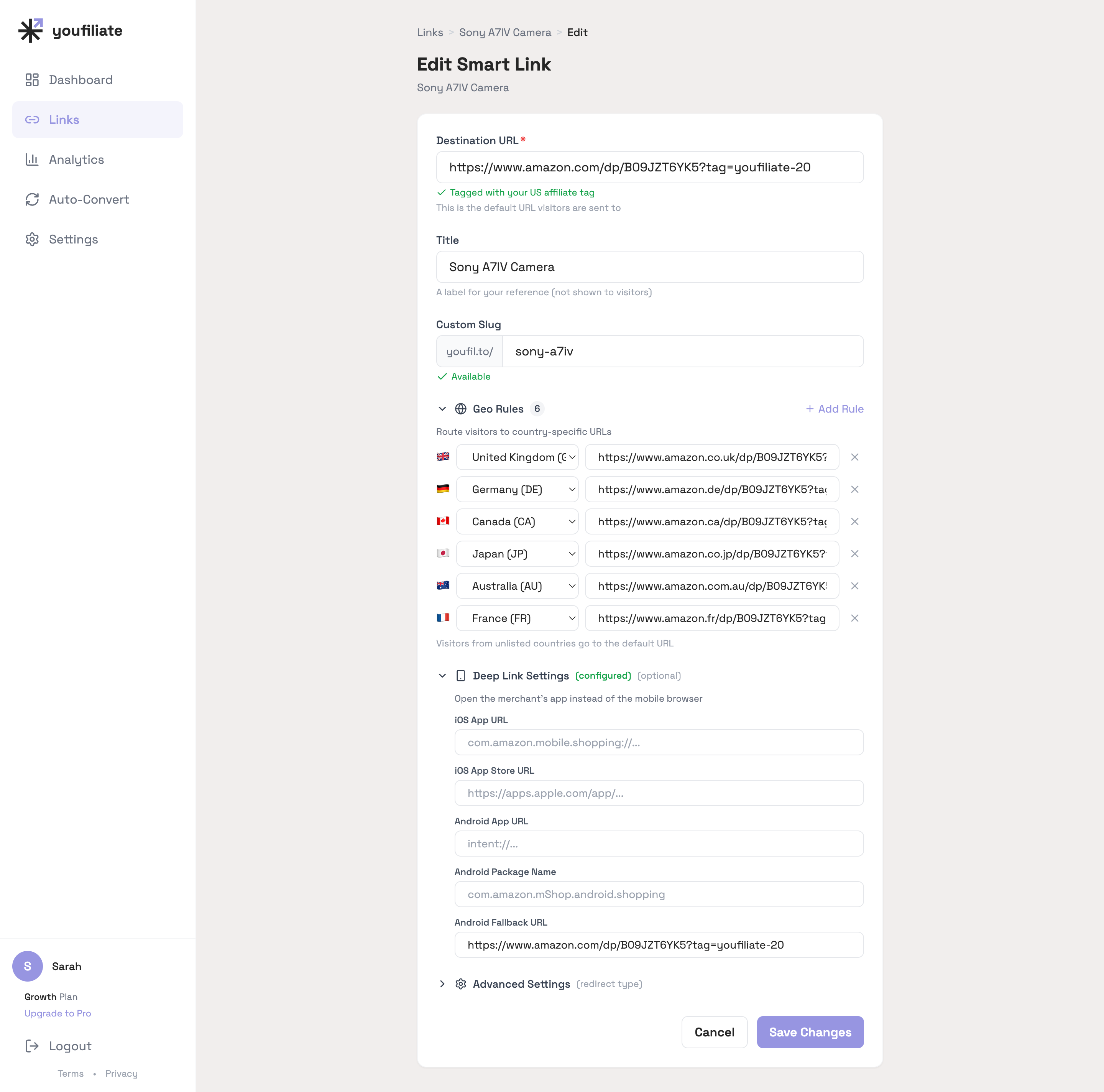
The whole deep-link config sits below the geo rules on the same edit screen: iOS scheme, App Store fallback, Android intent, package name, and the mobile-web fallback. For Amazon links it’s auto-populated from the ASIN — for non-Amazon merchants you fill the fields once and the smart link handles iOS, Android, and desktop fallbacks for you.
Other tools that offer deep linking include Geniuslink (per-click pricing) and LinkTwin (focused specifically on deep linking). See the full smart links guide for a wider tool comparison.
Amazon app deep links (manual)
You can manually construct Amazon deep links using Amazon’s URI schemes, but this is technical and fragile:
// iOS
com.amazon.mobile.shopping://www.amazon.com/dp/B09V3KXJPB/?tag=yourid-20

// Android
intent://www.amazon.com/dp/B09V3KXJPB/?tag=yourid-20#Intent;scheme=https;package=com.amazon.mShop.android.shopping;end
The problems with this approach: you need different links for iOS and Android, the links don’t fall back gracefully if the app isn’t installed, they don’t work at all on desktop, and you can’t combine them with geo-targeting. Smart link tools abstract away all of this complexity.
URL schemes vs. Universal Links
Modern deep linking uses two technologies:
Universal Links (iOS) / App Links (Android) — The modern standard. A regular HTTPS URL is associated with an app through a configuration file on the domain. When the user clicks the URL, the operating system checks if the associated app is installed and opens it directly. If not, the URL opens normally in a browser. This is seamless and doesn’t require special URL formats.
Custom URL schemes — The older approach. URLs like amazon://product/B09V3KXJPB trigger specific apps. These are less reliable, don’t fall back to web gracefully, and can show error messages if the app isn’t installed.
Smart link tools use Universal Links / App Links, which is why they work reliably without breaking the experience for desktop users or mobile users who don’t have the app installed.
Does Deep Linking Affect Affiliate Tracking?
This is the critical question, and the answer is: it depends on the implementation.
With smart link tools: Your affiliate tracking is preserved. The tool constructs the deep link in a way that carries your affiliate tag into the app. Purchases made in the app are correctly attributed to you.
With manual deep links: You need to include your affiliate tag in the deep link URL. If the tag is properly included, tracking works. If you construct the URL incorrectly, tracking can break.
Important caveat: Some affiliate programs have specific terms about how links can be modified or redirected. Amazon Associates, in particular, has rules about link manipulation. Using established smart link tools that are designed for affiliate compliance is safer than manually constructing deep links.
Always verify that your affiliate tag arrives intact by testing your links. Click the link on your phone, check the product page in the app, and verify that your tag appears in any share or copy-link functionality within the app.
Do I Need Deep Linking If My Audience Is Mostly Desktop?
If your audience is genuinely mostly desktop, the impact of deep linking is smaller. But check your actual data before assuming — most creators overestimate their desktop audience.
YouTube Studio → Analytics → Audience → Device type shows your viewer breakdown. For most channels, mobile is 60-80% of views. If that’s your case, deep linking affects the majority of your affiliate clicks.
Even for channels with higher desktop usage (common in B2B, programming, and professional niches), mobile still typically represents 30-40% of views. Deep linking improves conversion on that segment at zero additional effort.
The nice thing about deep linking through smart links is that it’s automatic. You don’t need to decide “should I use deep linking?” — the smart link detects the device and does the right thing. Desktop users get the normal web experience. Mobile users get the app experience. You just paste one link.
Does Deep Linking Work in YouTube Descriptions?
Yes. When a viewer watches a YouTube video on their phone and taps an affiliate link in the description, the link opens in the phone’s browser by default. With a deep-linked smart link, it opens the Amazon app (or relevant merchant app) instead.
This is particularly effective because the viewer is already in a mobile mindset — they’re watching on their phone, they tap the link, and they land directly in the app where they can buy with one tap. The entire flow stays native to the mobile experience.
Deep linking also works in:
- Instagram link-in-bio and Stories links
- TikTok bio links
- Email newsletters opened on mobile
- Blog posts viewed on mobile browsers
- Twitter/X posts opened in the app
- Any URL tapped on a mobile device
The same smart link works everywhere. You don’t need separate links for mobile vs. desktop or app vs. web.
What About Viewers Who Don’t Have the App Installed?
Good deep linking implementations handle this gracefully. If the viewer doesn’t have the Amazon app installed, the link falls back to the mobile web experience — exactly what would have happened without deep linking.
There’s no downside case. With deep linking:
- App installed → Opens in app (higher conversion)
- App not installed → Opens in mobile browser (same as without deep linking)
- Desktop → Opens in browser (same as without deep linking)
You never lose a click because of deep linking. You only gain conversions from viewers who have the app installed. It’s purely additive.
How Much More Revenue Can Deep Linking Generate?
The exact lift depends on your audience, niche, and the merchant app’s install rate. But the math is straightforward:
Assume:
- 1,000 monthly affiliate clicks
- 70% are mobile (700 mobile clicks)
- 60% of mobile users have the Amazon app installed (420 potential deep link clicks)
- Mobile web conversion: 3%
- Mobile app conversion: 10%
Without deep linking:
- 700 mobile clicks × 3% conversion = 21 sales
With deep linking:
- 420 app clicks × 10% conversion = 42 sales from app
- 280 non-app mobile clicks × 3% conversion = 8.4 sales from mobile web
- Total = ~50 sales
That’s roughly 2.4x more mobile conversions with the same traffic. The actual numbers will vary, but the directional impact is consistent: deep linking increases mobile conversion rates significantly.
Combined with geo-targeting for international audiences, a smart link that includes both features can substantially increase your total affiliate revenue without requiring any additional content or traffic.
Frequently Asked Questions
What is deep linking for affiliate marketing?
Deep linking sends mobile viewers directly into a merchant’s app (like Amazon) instead of opening a mobile web browser. The viewer sees the product inside the app where they’re already logged in with saved payment methods, resulting in 3-5x higher conversion rates compared to mobile web. Your affiliate tracking is preserved through the process.
Does deep linking work with Amazon affiliate links?
Yes. When a deep-linked Amazon affiliate URL is clicked on a phone with the Amazon app installed, the app opens directly to the product page with your affiliate tag intact. Purchases made in the app earn you commissions, and Amazon’s 24-hour cookie applies to everything the viewer buys in that session.
How much does deep linking increase affiliate conversions?
Mobile app conversion rates are typically 3-5x higher than mobile web conversion rates. The actual revenue increase depends on what percentage of your audience is on mobile (typically 60-80% for YouTube creators) and what percentage has the relevant merchant app installed. Most creators see a meaningful lift from deep linking because the majority of their traffic is mobile.
What happens if the viewer doesn’t have the app installed?
The link falls back to the normal mobile web experience — exactly what would have happened without deep linking. There’s no downside. Viewers with the app get the better experience; viewers without it get the standard experience. Deep linking is purely additive.
Is deep linking the same as geo-targeting?
No. Geo-targeting routes clicks to the correct regional store based on the viewer’s country. Deep linking routes clicks to the mobile app instead of a web browser. They solve different problems and work best together — a viewer in Germany on mobile would go directly into the Amazon.de app.
Do I need a special tool for deep linking?
For reliable deep linking across devices and apps, yes. Manually constructing deep links requires different URL formats for iOS and Android, doesn’t handle fallback gracefully, and can’t combine with geo-targeting. Smart link tools like Youfiliate, Geniuslink, and LinkTwin handle deep linking automatically across all devices and platforms.
Does deep linking affect my affiliate tracking or commission?
With established smart link tools, your affiliate tracking is preserved through the deep link. Purchases made in the app are correctly attributed to you. Always test your links by clicking on mobile and verifying your affiliate tag is present. Some affiliate programs have specific terms about link modification, so using compliant tools is recommended.
Does deep linking work on YouTube?
Yes. When a mobile viewer taps an affiliate link in a YouTube video description, a deep-linked smart link opens the merchant’s app instead of the browser. This works for any link in the description, pinned comments, or community posts viewed on a mobile device.
What percentage of viewers have the Amazon app installed?
Amazon app installation rates vary by country, but in the US, roughly 60-75% of smartphone users have the Amazon app installed. In the UK and Germany, rates are similarly high. This means deep linking can potentially improve conversion for the majority of your mobile audience.
Can I use deep linking without geo-targeting?
Yes, they’re independent features. You can use deep linking alone to improve mobile conversions without any geo-targeting. However, using both together maximizes your revenue — geo-targeting handles international viewers while deep linking handles mobile conversion. Most smart link tools include both features.
Does deep linking work with YouTube Shorts?
YouTube has removed affiliate link support from Shorts descriptions, so deep linking in Shorts is not currently viable. Focus on deep linking in standard long-form video descriptions where affiliate links are fully supported.
How do I test if deep linking is working on my affiliate links?
Click your smart link on your phone. If the Amazon app opens directly to the product page, deep linking is working. Check that your affiliate tag is preserved by using the “Share” function in the app to copy the product URL — your tag should be in the URL. Test on both iOS and Android if possible, and also verify the fallback by testing on a device without the app installed.
Is deep linking allowed by Amazon Associates terms of service?
Amazon’s Operating Agreement has rules about link modification. Using established smart link tools designed for affiliate compliance (Youfiliate, Geniuslink) is generally safe because they follow Amazon’s guidelines. Manually constructing deep links with custom URL schemes may risk violating Amazon’s terms. When in doubt, use a reputable tool rather than manual deep link construction.
Does deep linking work for non-Amazon affiliate links?
Yes. Deep linking works with any merchant that has a mobile app — eBay, Walmart, Target, Best Buy, Etsy, and many others. The conversion benefit applies wherever app checkout is smoother than mobile web checkout. For web-only products (SaaS, digital services), deep linking is less relevant since there’s no app to open.
Should small channels bother with deep linking?
Yes. Deep linking doesn’t require minimum traffic to be effective — it improves conversion rates on whatever traffic you have. If you get 100 clicks per month and deep linking converts 3 additional sales, that’s meaningful at any channel size. Since smart link tools with free tiers include deep linking automatically, there’s no cost barrier either.
What I See in Real Mobile Click Data
Two things that turn out to be more lopsided than feature comparisons make them sound:
- Mobile is the majority, not the minority. Across 86,531 click events on our demo dataset, mobile was 62% of all clicks, desktop 30%, tablet 5.6%. For creators whose links live primarily in YouTube descriptions, the mobile share usually sits higher still. If you don’t have deep linking turned on, two-thirds of your viewers are landing in a mobile browser when the merchant app was one tap away.
- The app fallback path is silently doing real work. Even with deep linking on, roughly 30-40% of mobile viewers don’t have the merchant app installed. A smart link with proper Universal Links / App Links falls back to the mobile web silently — those viewers never see an error, they just continue to the web version. The 60-70% who do have the app see a near-instant native flow. There’s no scenario where deep linking makes anything worse.
The takeaway: deep linking is one toggle, on by default if you set it up correctly, and it’s the highest-leverage single setting on most smart links. Skip it and you cap your mobile conversion at whatever mobile-web converts at, which is usually 3-5x lower than in-app.
Want smart links with deep linking and geo-targeting built in? Start free with 10 smart links at Youfiliate.com — every link automatically opens mobile apps and routes international viewers to their local store.
You're losing commissions on every international click
Smart links route viewers to their local store automatically
Try It Free — 10 Smart LinksNo credit card required.
Done reading? Try it yourself
Create a geo-targeted smart link in 60 seconds
Start Free — No Credit Card10 smart links free forever. Unlimited clicks on every plan.