How to Fix Amazon Affiliate Links That Open in the Browser Instead of the App
How to Fix Amazon Affiliate Links That Open in the Browser Instead of the App
Last updated: September 2026
The bottom line: Your Amazon affiliate links open in the browser instead of the app because the tap happens inside YouTube’s built-in browser, and that browser does not hand links off to other apps. You cannot fix it from YouTube Studio or from your Associates dashboard. The fix is to route the link through a redirect that runs before the page loads, detects the device, and opens the Amazon app itself. A smart link does exactly that, and it takes about a minute to set up.
This is the single most common question I get from creators once they start paying attention to where their mobile clicks go. They tap their own link on their phone, expecting the Amazon app, and land on a cramped mobile web page where they are not logged in. Then they assume they did something wrong in the description. They did not. Here is what is actually happening and how to stop it.
Why Do Amazon Affiliate Links Open in the Browser Instead of the App?
When a viewer taps a link in a YouTube description on a phone, YouTube does not send that tap to Safari or Chrome. It opens the URL inside its own embedded browser. That embedded browser is the whole problem.
On iPhone, Universal Links do not fire inside YouTube
Apple’s mechanism for opening a website URL in its matching app is called Universal Links. When you tap an amazon.com link in Messages or Safari, iOS checks whether the Amazon app has claimed that domain and, if so, opens the app. Apple documents the setup in its Universal Links guide.
The catch is that Universal Links only trigger on certain kinds of navigation. A tap inside an embedded web view, like the one YouTube uses, loads the page in that web view. iOS treats it as the app choosing to show a web page, not as the user asking to leave. So the Amazon app never gets the chance to open.
On Android, the same thing happens through a different door
Android uses App Links and intent filters for the same job. The Amazon Shopping app registers itself as a handler for amazon.com URLs, and Google’s App Links documentation describes how that verification works. But a WebView inside another app loads URLs directly. It does not ask the system whether some other app would like to handle the link. YouTube’s in-app browser is a WebView, so the Amazon app is never consulted.
The result on both platforms is the same
The viewer lands on Amazon’s mobile website inside YouTube. They are not logged in, because the embedded browser does not share cookies with the Amazon app. Their saved payment method and address are not there. If they want to buy, they need to sign in on a small screen first, and a lot of people will not bother. Your affiliate tag was attached to the click, but the purchase never happens.
Is There a Setting in YouTube or Amazon That Fixes This?
No. I want to be clear about this because creators waste hours looking for one.
YouTube has no option to open description links in the system browser. Amazon Associates has no setting that changes how its URLs behave inside another app’s browser. Adding ?openinapp=1 or similar parameters to the URL does nothing. Pasting an app URL scheme like com.amazon.mobile.shopping:// into a description does not work either, because YouTube only turns standard https links into something tappable.
Any fix has to happen between the tap and the Amazon page loading. That means a redirect you control.
How Does a Smart Link Fix the Browser Problem?
A smart link is a short URL that points at a redirect server instead of pointing directly at Amazon. When the viewer taps it, three things happen in well under a second:
- The redirect server reads the request and works out whether the device is an iPhone, an Android phone, or a desktop.
- On a phone, it responds with an app-opening link for that platform rather than a plain web URL, so the device launches the Amazon app on the product page.
- If the app is not installed, it falls back to the regular mobile web page, so the click is never lost.
Because the redirect is a normal https URL, YouTube treats it as a standard link and makes it tappable. The app handoff happens on the redirect, where you control the behaviour, not inside YouTube’s browser, where you do not.
This is the technique usually called deep linking. If you want the full background on how it works and how it interacts with affiliate tracking, read what deep linking is for affiliate links. For the rest of this post I will stick to the practical fix.
How to Fix It: Step by Step
You need a smart link tool that supports Amazon deep linking. I built Youfiliate for exactly this, so the steps below use it, but the shape of the fix is the same with any tool that does the redirect properly.
Step 1: Paste your Amazon affiliate URL
Log in, click Create Smart Link, and paste the full Amazon product URL with your tag on it. Use the long form, not an amzn.to short link, so the product ID can be read from the URL.
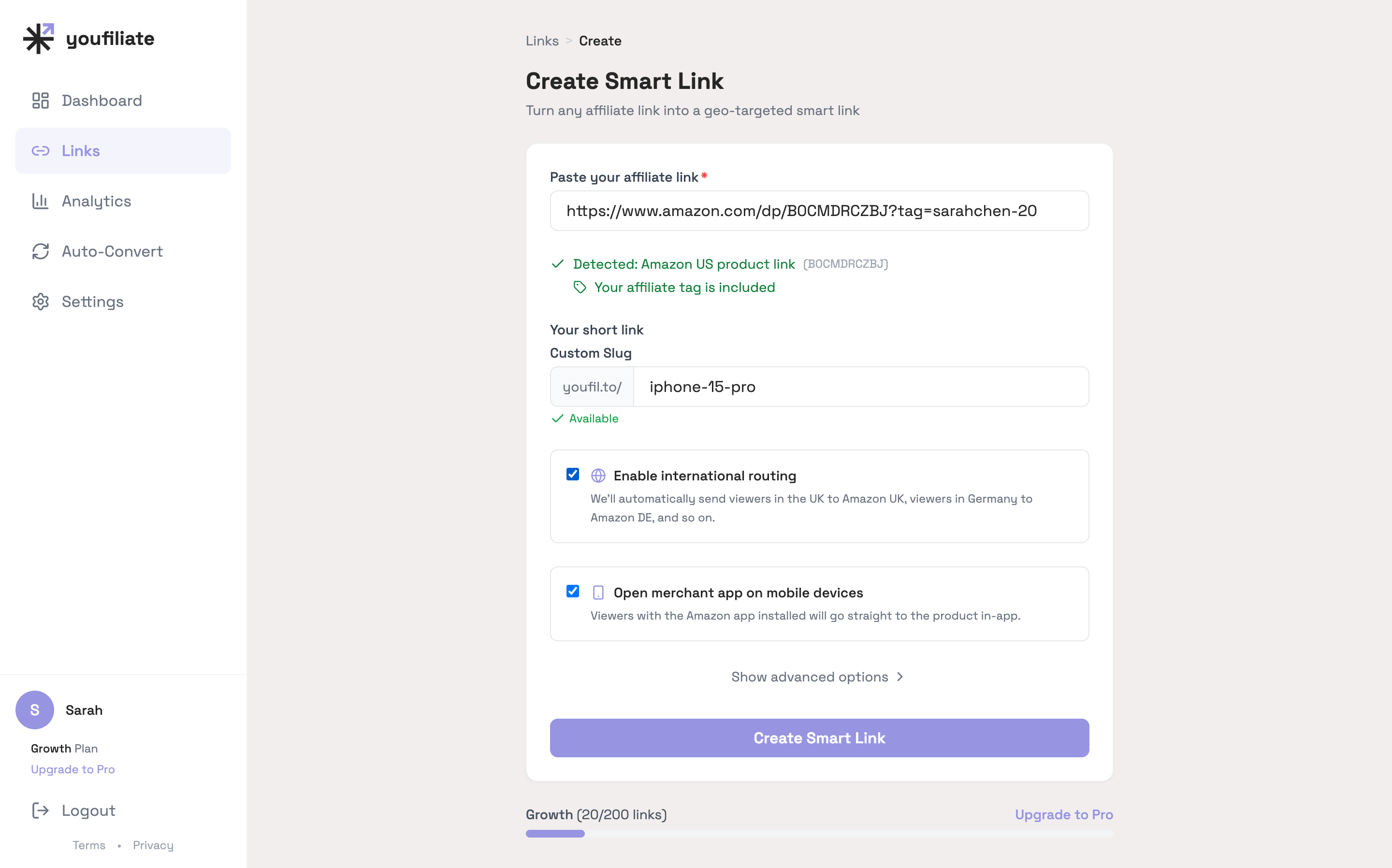
The tool detects that it is an Amazon link, pulls out the ASIN, and confirms your affiliate tag is present. Two toggles are checked by default: international routing and merchant-app deep linking. The second one is the fix for this whole problem. Leave it on.
Step 2: Check the deep link settings
Open the geo-rules editor for the link. Underneath the country rows there is a Deep Link Settings panel showing the iOS and Android app configuration for Amazon. For Amazon links this is filled in automatically, so there is nothing to type.
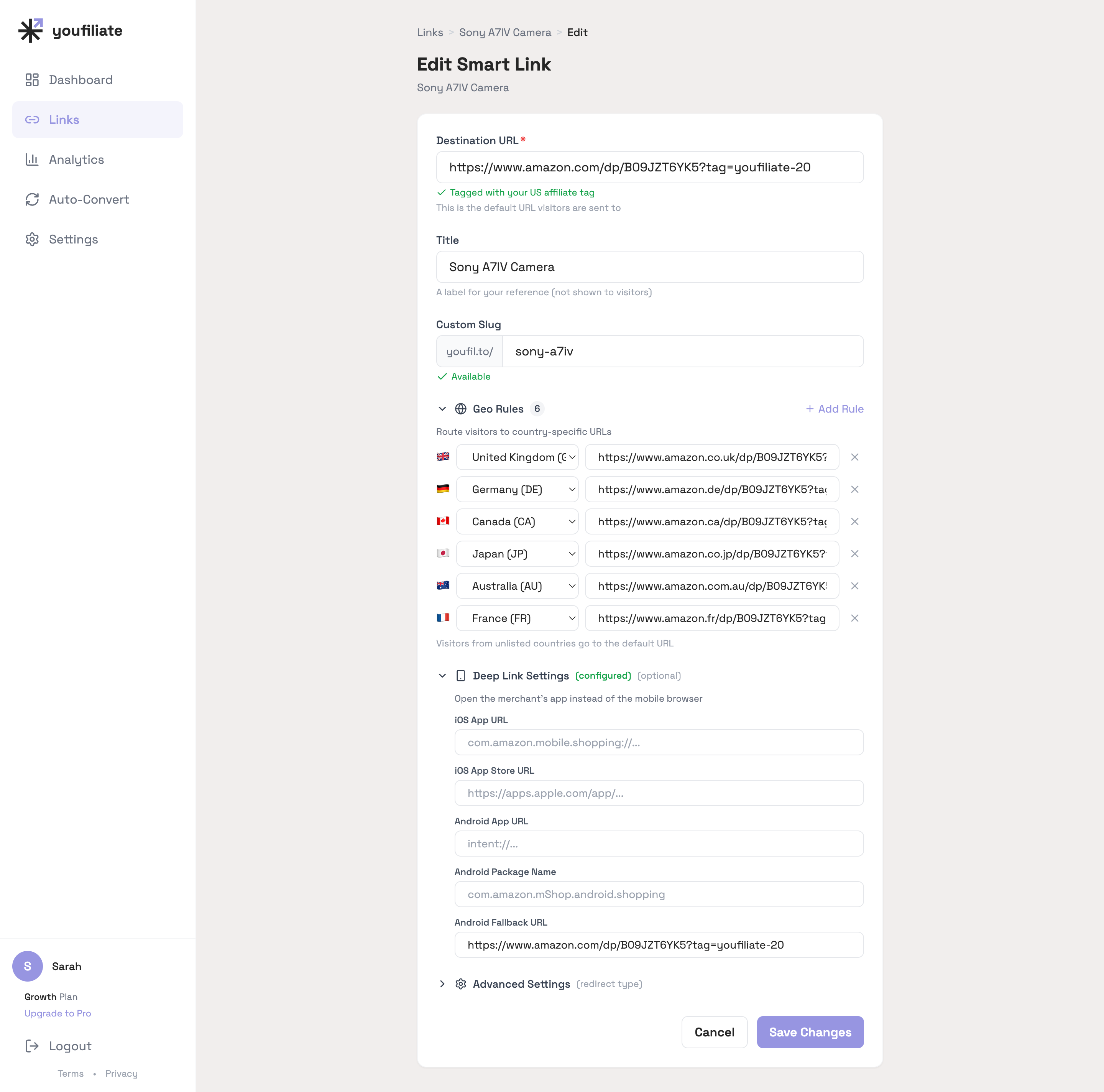
The country rows are a separate feature, geo-targeting, which sends viewers in other countries to their local Amazon store. It is worth setting up at the same time, because a viewer in the UK who taps an amazon.com link has two problems at once: the wrong store and the wrong browser. One smart link fixes both. But if you only care about the app problem today, the default US rule with deep linking on is enough.
Step 3: Pick a short URL and copy it
Choose a slug, something like youfil.to/mic, and copy the finished link. If you want a more detailed walkthrough of this screen, the first smart link tutorial covers every field.
Step 4: Replace the link in your description
Open YouTube Studio, find the video, and swap the raw Amazon URL for the smart link. Keep your affiliate disclosure where it was. If you have a large back catalog, Youfiliate can connect to your channel and replace links across every description in one pass, which beats editing hundreds of videos by hand.
Step 5: Test it on your own phone
This is the step people skip, and it is the one that proves the fix. Open the YouTube app on your phone, go to the video, and tap the link. On an iPhone with the Amazon app installed, the app should open on the product page. Same on Android. Then try it on a phone without the Amazon app, or after temporarily uninstalling it, and confirm you land on the mobile website instead of an error.
Does My Affiliate Tag Survive the Redirect?
Yes. The redirect passes the full product URL, tag included, into the app. Amazon’s app reads the tag the same way the website does, and the purchase is attributed to you whether it happens in the app or on the web. Nothing about the Associates cookie or the 24-hour window changes.
What you should check is that the tag is on the URL you pasted in the first place. If you paste a bare product URL with no tag, the smart link will faithfully redirect to a bare product URL. Youfiliate flags a missing tag at creation time, which is the green “affiliate tag verified” check in the screenshot above.
How Do I Know the Fix Is Working?
Two signals.
First, the manual test in Step 5. If your own phone opens the Amazon app from inside YouTube, every viewer on the same platform will get the same behaviour.
Second, your click analytics. A smart link records the device and operating system on every click, so you can see how much of your traffic is mobile and split it by iOS and Android. What you cannot see from the link side is Amazon’s conversion, because Amazon reports that in the Associates dashboard, not to the redirect. So watch your Associates reports over the following weeks and compare the ordered-items rate for the videos you converted against the ones you have not touched yet. That comparison, on your own channel, is the only number that matters.
Frequently Asked Questions
Why does my Amazon affiliate link open in the browser on iPhone?
Because YouTube opens description links in its own embedded browser, and Apple’s Universal Links do not trigger for taps inside an embedded web view. The Amazon app never gets a chance to claim the link. Routing the link through a smart link redirect moves the app handoff out of YouTube’s browser and into a step you control.
Does the same problem happen on Android?
Yes. YouTube’s Android app uses a WebView for description links, and a WebView loads URLs directly instead of asking the system whether the Amazon app should handle them. The fix is the same on both platforms.
Can I put an Amazon app link directly in my YouTube description?
No. YouTube only makes standard https links tappable. App URL schemes are ignored. You need a normal https link that performs the app redirect after the tap, which is what a smart link is.
Do I need to change anything in my Amazon Associates account?
No. Your existing tag and account work unchanged. The redirect carries the tag into the app, and Amazon attributes the sale to you exactly as it would from a web click.
What happens if the viewer does not have the Amazon app installed?
They land on the regular Amazon mobile website with your tag attached. A correctly configured smart link always has this fallback, so the click is not lost. The viewer just gets the web checkout instead of the app checkout.
Does this work for links in pinned comments and Shorts?
Yes. Any place YouTube renders a tappable https link goes through the same in-app browser, and the same redirect fixes it. Use the same smart link in the description, the pinned comment, and the Shorts link field.
Will fixing this also send international viewers to their local Amazon store?
Only if you add geo rules. Deep linking fixes which app opens. Geo-targeting fixes which country’s store opens. Youfiliate suggests geo rules for six international stores when you paste an Amazon link, so it is worth turning both on in the same minute.
Stop Sending Phone Viewers to a Logged-Out Browser
Most YouTube viewing happens on phones, and every one of those taps on a raw Amazon link opens a browser where the viewer has to sign in before they can buy. That is not something YouTube or Amazon will fix for you. A smart link with deep linking turned on moves the app handoff to a step you control, and it takes one paste and one toggle.
Start free with 3 smart links at Youfiliate.com. No credit card required.
You're losing commissions on every international click
Smart links route viewers to their local store automatically
Try It Free — 3 Smart LinksNo credit card required.
Done reading? Try it yourself
Create a geo-targeted smart link in 60 seconds
Start Free — No Credit Card3 smart links free forever. Unlimited clicks on every plan.