How to Automatically Localize Amazon Affiliate Links So Each Viewer Goes to Their Country Store
How to Automatically Localize Amazon Affiliate Links So Each Viewer Goes to Their Country Store
Yes, you can automatically localize Amazon affiliate links so that a single link detects each viewer’s country and routes them to their local Amazon storefront — amazon.co.uk for UK viewers, amazon.de for Germans, amazon.ca for Canadians, and so on — with your country-specific affiliate tag attached so you earn the commission. This is called link localization or geo-routing, and four tools handle it today: Amazon OneLink (free), Geniuslink (per-click pricing), LinkTwin (flat-rate), and Youfiliate (flat-rate, built for YouTube creators).
TL;DR: Every time a viewer outside the US clicks your standard amazon.com affiliate link, you risk losing the commission — they land on the wrong store, your tracking tag gets no attribution, and you earn nothing. Link localization tools detect the viewer’s country and redirect to their local storefront with the correct affiliate tag. Amazon OneLink does this for free but has accuracy limits. Dedicated smart link tools like Geniuslink, LinkTwin, and Youfiliate do it more reliably — with Youfiliate being the only option purpose-built for YouTube creators with flat-rate pricing and bulk description updates.
If you’re a YouTube creator posting Amazon affiliate links in your video descriptions, a significant chunk of your audience is outside the United States. Typical YouTube channels see 30-50% international viewership. The Amazon Associates programs that matter most for YouTube creators are the seven Amazon already auto-detects (US, UK, DE, JP, CA, AU, FR), with Italy and Spain worth adding if you have meaningful click share there. Every one of those international viewers clicking your raw amazon.com link is a potential commission you silently lose — and unless you check your analytics by country, you never even know it happened. This post covers exactly why that happens, how localization fixes it, and which tool makes the most sense depending on your traffic and workflow.
Why Your International Viewers Lose You Commissions
Your Amazon Associates tag only works on one storefront. A US tag earns nothing on amazon.co.uk, amazon.de, or any other international store. When a UK viewer clicks your amazon.com link, they either stay on the wrong store or get redirected with your tag stripped. Either way, zero commission. The revenue math compounds with audience size — at 50K clicks/month and 35% international traffic, that’s ~17,500 monthly clicks earning nothing unless they’re routed properly.
Link localization fixes this by detecting each viewer’s country and routing them to the correct Amazon storefront with your country-specific affiliate tag attached — all in milliseconds. For a deeper explanation of how geo-targeting works for affiliate links, see our explainer.
The Four Ways to Automatically Localize Amazon Affiliate Links
Each of these tools handles geo-routing differently. Here is what you need to know about each one, specifically as a YouTube creator posting links in video descriptions.
Amazon OneLink (Free — Best for Beginners)
Amazon OneLink is Amazon’s native geo-routing tool, built directly into Associates Central. It is free for all Associates members with no monthly fee or click limits. After setup, any native amazon.com or amzn.to link in your content automatically redirects international visitors to their local storefront. OneLink supports roughly 13 Amazon storefronts: UK, DE, JP, CA, AU, FR, IT, ES, NL, PL, SA, SG, and SE.
Setup requires connecting each country’s Associates account in your OneLink dashboard. Once connected, OneLink handles the routing automatically — but only for native Amazon URLs.
The limitations for YouTube creators are real. OneLink does not process branded or shortened URLs — if you use any third-party link shortener in your YouTube description, OneLink’s geo-routing does not apply. It provides no per-link analytics, so you cannot see which videos drive which international clicks. And Geniuslink’s own controlled testing (840 clicks across 6 storefronts) found that 57% of OneLink’s EU-destined clicks landed on search results pages instead of the correct product listing. That means more than half of your international clicks hit a dead end where conversion rates drop sharply.
OneLink is the right starting point if you have primarily US traffic and are not ready to pay for a dedicated tool. But understand the trade-off: lower accuracy means lower international conversions.
Geniuslink (Per-Click Pricing — Best for Multi-Program Affiliates)
Geniuslink, a third-party smart link platform and Amazon Verified Partner that has been in the affiliate localization space since 2012, supports 20+ Amazon storefronts plus non-Amazon affiliate programs like impact.com, ShareASale, and CJ Affiliate. Their product-matching algorithm is claimed to be 118% more accurate than OneLink based on their own controlled testing.
To use Geniuslink, you paste your Amazon product URL and it generates a geni.us short link. Every click on that link is automatically geo-routed to the correct storefront with your country-specific affiliate tag. The short links work in YouTube descriptions, social media, and anywhere else you share links.
Pricing is per-click: $6/month base plus approximately $2.50 per 1,000 clicks (current pricing at geniuslink.com, as of March 2026). For a YouTube creator with 5,000 monthly affiliate link clicks, that is about $19/month. At 50,000 clicks, it reaches roughly $131/month. At 100,000 clicks, you are paying approximately $256/month. For a full evaluation, see our Geniuslink review for 2026. There is no YouTube-native integration — no OAuth, no way to bulk-update existing video descriptions. For a creator with 500 videos, manually creating and replacing each link with a Geniuslink URL is feasible but time-consuming.
LinkTwin (Flat-Rate — Good All-Rounder)
LinkTwin, a third-party smart link platform and Amazon Verified Partner, supports 20+ Amazon storefronts with auto geolocation, link analytics, and retargeting pixels on a flat monthly rate. The mechanism is the same as Geniuslink: create a short link, and visitors are geo-routed to their local store with your country affiliate tag attached.
LinkTwin includes smart fallback logic for countries without an Amazon store — Portuguese viewers are automatically redirected to amazon.es, Austrian viewers to amazon.de. This is a useful feature for creators with geographically diverse audiences.
Pricing is straightforward: free tier with 500 clicks/month, or $14/month for unlimited clicks. No per-click charges. There is no YouTube-native integration or bulk description update feature, so updating existing videos still requires manual work.
Youfiliate (Flat-Rate — Built for YouTube Creators)
Youfiliate, a smart link platform built specifically for YouTube creators and affiliate marketers, geo-routes Amazon affiliate links to the correct local storefront per viewer country. You create a smart link by pasting your Amazon product URL, then set country-specific destination URLs — UK clicks go to amazon.co.uk with your UK Associates tag, DE clicks go to amazon.de with your DE tag, and so on. Every click gets full analytics broken down by country, device, and referrer.
Branded short URLs (youfil.to/your-slug) work in YouTube descriptions, pinned comments, and any social platform. The YouTube auto-convert feature is the differentiator here: it updates all your existing video descriptions to smart links in a single action via YouTube OAuth. For a creator with hundreds of old videos containing raw amazon.com links, this is the difference between a weekend of manual copy-pasting and a one-click bulk conversion. No other tool in this comparison offers that.
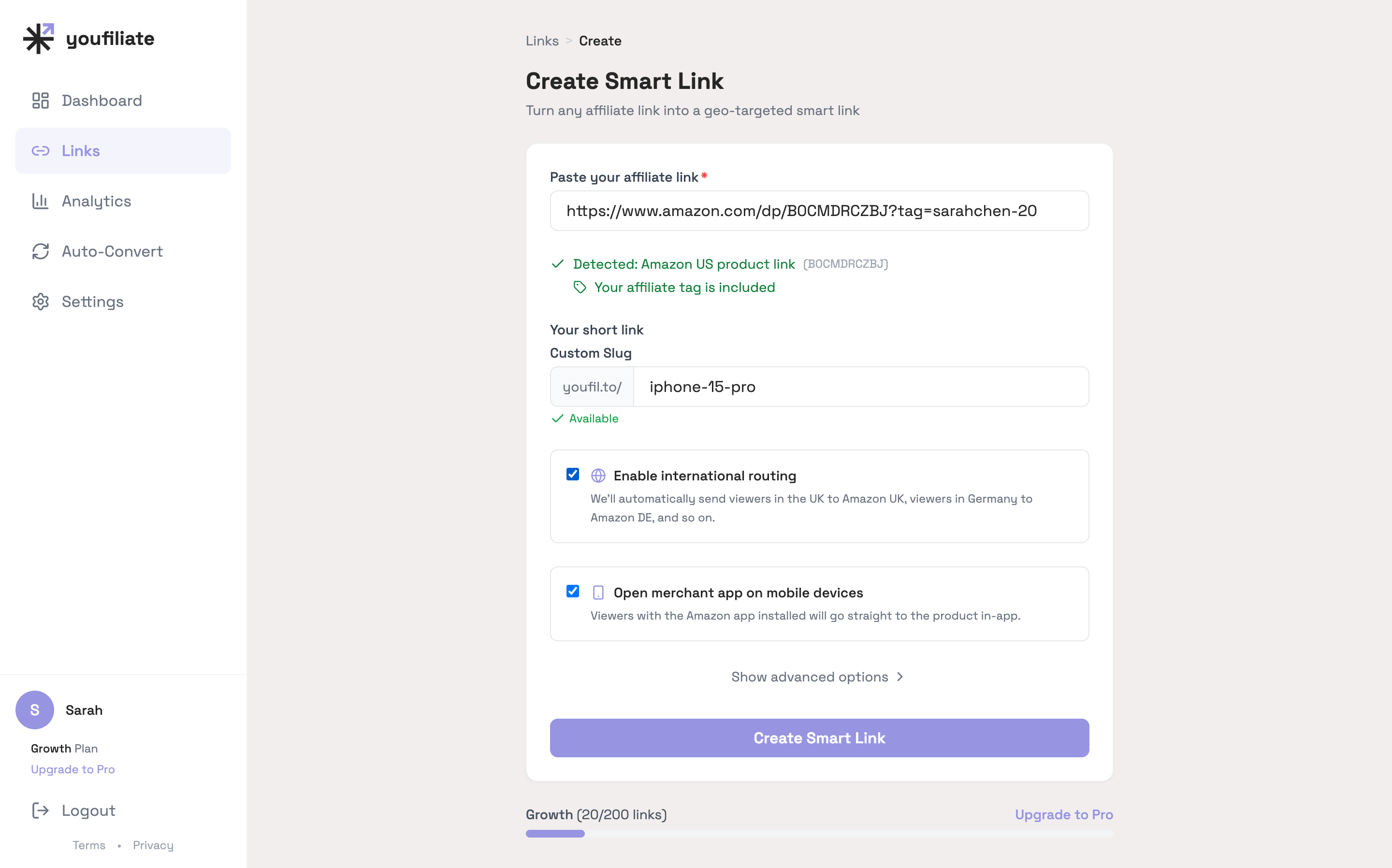
The creation flow for an Amazon link is: paste URL, name slug, hit Create. The ASIN gets extracted, the affiliate tag is verified, and the geo-routing + app-opening toggles are enabled by default. From there you fill in the country-specific tags for whichever Amazon Associates programs you’ve joined.
Pricing: free for 10 smart links, $9/month for 50, $19/month for 200, $49/month for unlimited. All plans include unlimited clicks with no per-click charges.
Feature and Pricing Comparison at a Glance
This table covers the features that matter most for YouTube creators who want to automatically localize Amazon affiliate links.
| Feature | Amazon OneLink | Geniuslink | LinkTwin | Youfiliate |
|---|---|---|---|---|
| Cost | Free | $6/mo + per-click | $14/mo flat | $9-$49/mo flat |
| Pricing model | Free | Per-click | Flat rate | Flat rate |
| Amazon storefronts | ~13 | 20+ | 20+ | Custom per-country |
| Branded short URLs | No | geni.us | linktw.in | youfil.to |
| Per-link click analytics | No | Yes | Yes | Yes |
| Non-Amazon affiliate support | No | Yes | Partial | Partial |
| YouTube description compatible | Partial* | Yes | Yes | Yes |
| YouTube auto-convert (bulk) | No | No | No | Yes |
| Deep linking (app opening) | No | No | No | Yes |
| Free tier | Yes (unlimited) | 14-day trial | 500 clicks/mo | 10 links free |
*OneLink only processes native amazon.com or amzn.to URLs — it does not work with any branded or custom short URL in descriptions.
Accuracy: Which Tool Routes to the Right Product Page?
Geo-routing is only valuable if the viewer lands on the correct product — not a search results page. Geniuslink’s controlled testing across 840 clicks and 6 EU storefronts found that OneLink sent 57% of those clicks to search results pages rather than the actual product listing. Geniuslink’s own algorithm matched the correct product 97% of the time in the same test. LinkTwin and Youfiliate use direct URL mapping — you specify the exact destination URL per country — which means product-matching accuracy is 100% for any country where you configure a geo-rule. The trade-off is manual setup: you paste each country’s product URL yourself rather than relying on algorithmic matching. For creators who sell the same 10-20 core products repeatedly, this takes minutes and guarantees every click lands on the right page.
Pricing at Scale: What You Actually Pay
The pricing model matters more than the base price. Here is what each tool costs a YouTube creator at different traffic levels:
| Monthly Clicks | Amazon OneLink | Geniuslink | LinkTwin | Youfiliate |
|---|---|---|---|---|
| 5,000 | Free | ~$19 | $14 | $9-$19 |
| 20,000 | Free | ~$56 | $14 | $19-$49 |
| 50,000 | Free | ~$131 | $14 | $49 |
| 100,000 | Free | ~$256 | $14 | $49 |
OneLink is genuinely free and is the right choice for creators just getting started. The real cost of OneLink is opportunity cost: lower product-matching accuracy translates to international clicks landing on search results instead of product pages, silently losing you commissions that would more than cover a paid tool.
For a side-by-side cost breakdown at every traffic tier, see our smart link pricing comparison. The inflection point where Youfiliate’s Pro plan ($49/month) becomes cheaper than Geniuslink is approximately 17,000-18,000 clicks per month. At that volume, Geniuslink costs about $6 + (17 x $2.50) = $48.50/month. Above that threshold, every additional click widens the gap. A creator at 100,000 monthly clicks saves over $200/month — $2,400/year — on a flat-rate plan versus Geniuslink’s per-click model.
Which Tool Should You Pick?
Choose based on your current traffic volume and how many existing videos you need to update:
- Under 5,000 monthly affiliate clicks with mostly US traffic: Start with Amazon OneLink. It is free, and your international volume is low enough that the accuracy limitations cost you relatively little.
- 5,000-20,000 monthly clicks with international traffic: Youfiliate’s Starter or Growth plan ($9-$19/month) gives you branded short URLs, per-country analytics, and YouTube bulk description updates at a lower cost than Geniuslink.
- 20,000+ monthly clicks: Flat-rate pricing becomes essential. At this volume, Geniuslink’s per-click model costs $56-$256+/month, while Youfiliate’s Pro plan caps at $49/month regardless of click volume. The savings compound every month.
- Multi-program affiliates (Amazon + impact.com + ShareASale): Geniuslink has the broadest non-Amazon affiliate network support. If you rely heavily on non-Amazon programs, Geniuslink’s per-click cost is the price of that flexibility.
For a detailed head-to-head analysis of three of these tools, see our Amazon OneLink vs Geniuslink vs Youfiliate comparison.
How to Set Up Amazon Affiliate Link Localization (Step by Step)
Whether you are starting fresh or converting an existing video library, the setup process follows the same four steps.
Step 1: Register for Amazon Associates Accounts in Each Target Country
Every localization tool requires you to have separate Amazon Associates accounts for each country where you want to earn commissions. The link routing works without these accounts — your viewers still land on their local store — but without a country-specific affiliate tag, you earn nothing from that storefront.
Start with your highest-traffic international markets. Check your YouTube Analytics geographic data (YouTube Studio > Analytics > Audience > Geography) to see where your viewers are. Most English-language creators find that the UK, Canada, Germany, and Australia are their top international markets. Register for Associates accounts at affiliate-program.amazon.co.uk, associates.amazon.ca, and the equivalent for each target marketplace. Amazon’s unified account system lets you manage multiple marketplace registrations from a single Amazon login — you do not need separate email addresses for each country. New international Associates accounts typically take 1-3 business days for approval, and Amazon requires you to generate at least 3 qualifying sales within 180 days to keep each account active.
Step 2: Create Your Localized Smart Link
The process is nearly identical across tools:
- Copy the Amazon product URL from your primary marketplace (usually amazon.com)
- Paste it into your chosen tool — Geniuslink, LinkTwin, or Youfiliate
- Connect your country-specific affiliate IDs for each locale you want to target
- The tool generates a single short link — this is your localized “universal” affiliate link
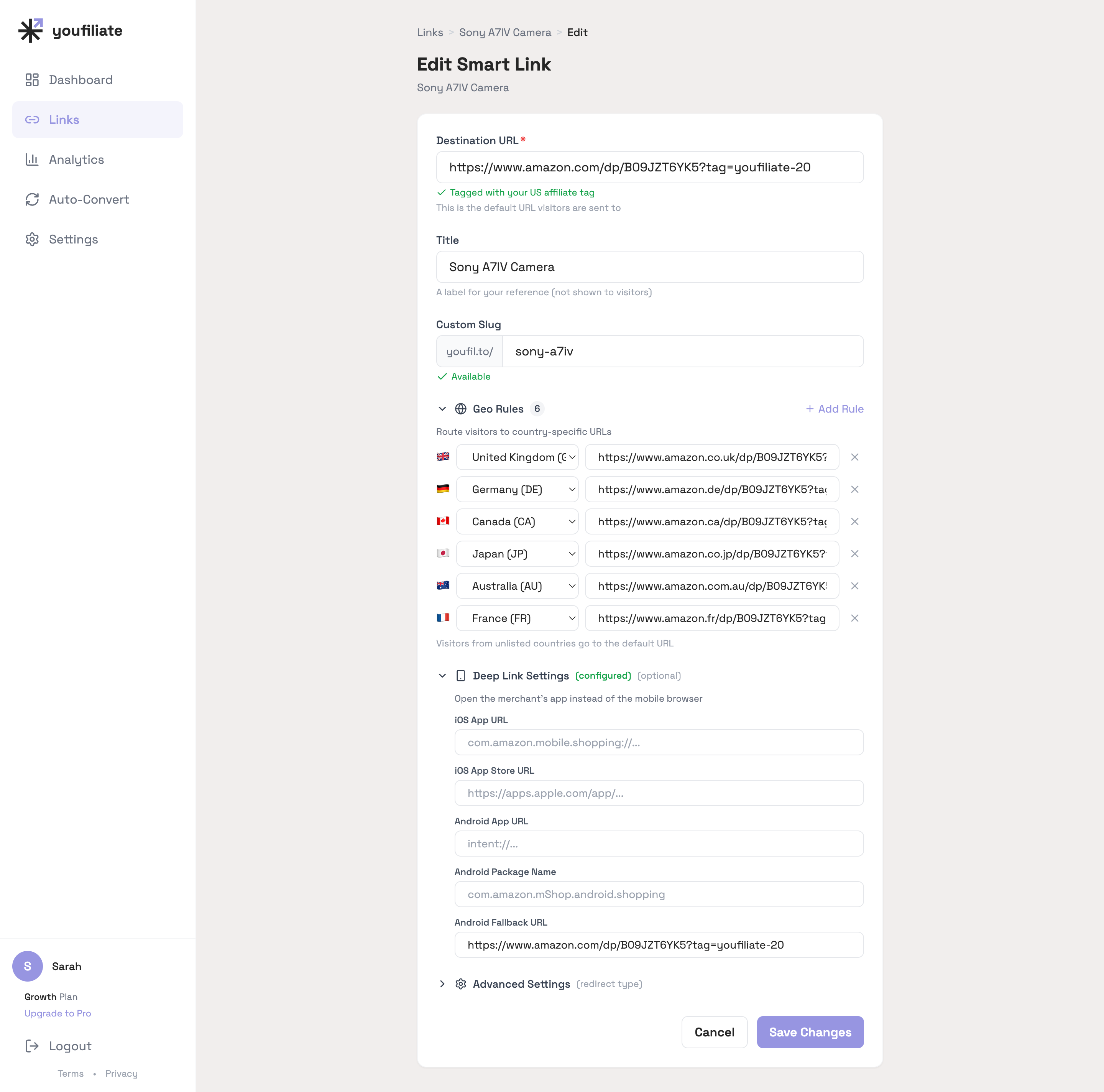
What that one localized link looks like fully configured: six geo rules covering the major international markets, plus the deep-link config that handles the Amazon app on mobile. Add or remove rows as you sign up for additional Associates programs.
That one link now handles all the geo-routing automatically. Use it in YouTube descriptions, pinned comments, social posts, newsletters — anywhere you share affiliate links.
Step 3: Replace Your Existing Links
For new videos, use your smart links from day one. The challenge is your existing library.
If you have a handful of videos, manual replacement is straightforward — edit each description, swap the old amazon.com link for the new smart link, save. For a creator with 50 or more videos, this becomes a meaningful time investment.
Youfiliate’s YouTube auto-convert feature handles this at scale: connect your YouTube channel via OAuth and convert all existing description links to smart links in one action. No manual editing of individual videos. This is the single biggest workflow difference between Youfiliate and every other tool in this comparison — and the reason it matters most to YouTube creators with an established library. If you have a substantial back catalog to monetize, this feature alone justifies the subscription.
Step 4: Check Your Analytics
After a week of running localized links, review your click data by country. Every smart link tool (Geniuslink, LinkTwin, Youfiliate) provides per-country breakdowns. Amazon Associates Central does not show this per-link data — another reason a dedicated tool adds value.
Look for countries with significant click volume where you do not yet have an Associates account. That is a direct signal to enroll. If you are seeing 500 clicks per month from Japan but have no amazon.co.jp affiliate account, you are leaving those commissions uncollected.
Frequently Asked Questions About Localizing Amazon Affiliate Links
Can one Amazon affiliate link automatically work for all countries?
Yes. A localized affiliate link — also called a smart link or geo-targeted link — detects each viewer’s country and automatically redirects them to their local Amazon storefront with your country-specific affiliate tag attached. Amazon OneLink does this for free for native Amazon URLs. Dedicated tools like Geniuslink, LinkTwin, and Youfiliate extend this to branded short URLs that work in YouTube descriptions, social media posts, and newsletters. The key requirement: you need an Amazon Associates account registered in each country where you want to earn commissions. The link routing works without it, but your tag will not be recognized on storefronts where you are not enrolled.
Does Amazon OneLink work for YouTube affiliate links?
Partially. Amazon OneLink processes native amazon.com and amzn.to URLs, so it will geo-route those links in your YouTube descriptions. However, it does not process branded or shortened URLs from third-party services. If you use any link shortener or custom domain, OneLink’s geo-routing does not apply. OneLink also provides no per-link analytics and does not open the Amazon app on mobile. For YouTube creators who want full localization with analytics, branded URLs, and app opening, a dedicated smart link tool is more reliable.
Do I need separate Amazon accounts for each country to localize links?
Yes. To earn commissions in a specific country, you need an Amazon Associates account registered to that country’s marketplace — a UK Associates account for amazon.co.uk, a DE account for amazon.de, and so on. Link localization tools route traffic to the correct local store regardless, but without a country-specific affiliate ID connected, your tag is not recognized and you earn no commission from that storefront. Start by enrolling in the 3-4 countries that represent your largest international audience segments.
What happens to viewers in countries without an Amazon store?
Smart link tools handle this with fallback logic. If a viewer is in a country without a local Amazon storefront — Portugal has no amazon.pt, for example — tools like LinkTwin automatically redirect them to the nearest regional store (amazon.es for Portuguese viewers). Youfiliate’s custom geo-rules let you specify the fallback destination for any country explicitly. Without a configured fallback, most tools redirect to your default destination, usually amazon.com. The viewer still reaches a functional store; you just need an Associates account for that fallback storefront to earn the commission.
What is the best free tool to localize Amazon affiliate links?
Amazon OneLink is the best free tool to localize Amazon affiliate links. It is built into Amazon Associates Central, requires no third-party account, and automatically redirects international viewers to their local Amazon store across roughly 13 storefronts. Its main limitations are lower product-matching accuracy than paid tools (57% of EU-destined clicks landed on search results in Geniuslink’s controlled testing), no branded short URLs, no per-link analytics, and no app-opening deep links. For YouTube creators just starting out with mostly domestic traffic, OneLink is a solid baseline. For creators with significant international traffic, Youfiliate delivers measurably better results with branded short URLs, per-country analytics, and YouTube bulk description updates — at a predictable flat monthly rate.
How does Youfiliate localize Amazon affiliate links differently than Geniuslink?
Both Youfiliate and Geniuslink geo-route clicks to the correct Amazon storefront using the viewer’s IP address. The key differences are pricing and YouTube integration. Geniuslink charges per click — $6/month base plus approximately $2.50 per 1,000 clicks — which means a creator with 50,000 monthly clicks pays roughly $131/month. Youfiliate charges a flat monthly rate ($49/month for unlimited links and unlimited clicks), so costs stay predictable regardless of traffic volume. Youfiliate also offers a YouTube auto-convert feature that updates all existing video descriptions to smart links in one action via YouTube OAuth — Geniuslink has no equivalent feature. For the full head-to-head, see the Geniuslink vs Youfiliate comparison.
What I See Across Localized Amazon Links
A few patterns from watching real click data flow through localized Amazon smart links:
- The seven-storefront default covers ~85-90% of value. US default + UK, DE, JP, CA, AU, FR is the configuration Youfiliate auto-suggests. Across the click data I see, that set captures the overwhelming majority of international clicks. Spain, Italy, Netherlands, and Singapore each contribute 1-2% on their own — add them only when your analytics show real volume.
- OneLink misses are invisible. The 57% search-results-page rate Geniuslink documented isn’t something a creator can see from their own Amazon dashboard — Amazon doesn’t report which clicks landed on a search page vs a product page. Most creators using OneLink have no idea this is happening until they switch to a tool with per-link, per-country analytics and see the destination-URL field next to each rule.
- A handful of products do almost all the revenue. On a 20-link creator catalog, one or two top performers (Sony A7IV at 12,847 clicks in my dataset, Rode Wireless Go II at 8,234) routinely account for 25%+ of total clicks. Localize those first. The long tail can wait until you’ve validated the geo-routing flow on the links that matter most.
Start Localizing Your Links
If you have Amazon affiliate links in your YouTube descriptions and any portion of your audience is outside the US, you are losing commissions every day those links stay unlocalized. The fix is straightforward: pick a localization tool that fits your traffic level and workflow, register Associates accounts in your top international markets, and replace your raw amazon.com links with geo-routed smart links.
For YouTube creators specifically, the combination of flat-rate pricing, branded short URLs, per-country analytics, and bulk description updates makes Youfiliate the most complete solution for Amazon affiliate link localization. Start free with 10 smart links at Youfiliate.com — no credit card required. When you are ready to convert your existing video library, flat-rate plans start at $9/month.
You're losing commissions on every international click
Smart links route viewers to their local store automatically
Try It Free — 10 Smart LinksNo credit card required.
Done reading? Try it yourself
Create a geo-targeted smart link in 60 seconds
Start Free — No Credit Card10 smart links free forever. Unlimited clicks on every plan.