How to Switch from Geniuslink to Youfiliate (Without Breaking Your Links)
How to Switch from Geniuslink to Youfiliate (Without Breaking Your Links)
To switch from Geniuslink, a per-click smart link service, to Youfiliate, a flat-rate smart links platform for YouTube creators, you recreate your smart links in Youfiliate first, bulk-replace every geni.us URL in your YouTube descriptions using Youfiliate’s auto-convert feature, verify the new links work, and only then cancel your Geniuslink account. The order matters: all geni.us links die the instant your Geniuslink account closes, with no grace period and no automatic redirects.
TL;DR: Switching from Geniuslink to Youfiliate takes under an hour for most creators. The critical rule is never cancel Geniuslink until every old geni.us link has been replaced. Youfiliate’s free tier lets you migrate first and cancel later, so there is zero link downtime and zero risk.
The number one mistake creators make when leaving Geniuslink is canceling the account before updating their video descriptions. One click of “close account” and every geni.us link across hundreds of videos goes dead — silently killing affiliate revenue with no way to undo it. This guide walks you through the exact migration process so that does not happen to you.
Why Creators Are Leaving Geniuslink
Geniuslink charges per click: $5/month base plus $2 for every 1,000 clicks beyond the first 2,000 (Geniuslink pricing). That pricing model works for small channels, but it becomes a problem fast. Here is what it actually costs at scale:
| Monthly Clicks | Geniuslink Cost | Youfiliate Cost | Monthly Savings | Annual Savings |
|---|---|---|---|---|
| 10,000 | $21/mo | $9/mo (Starter) | $12 | $144 |
| 50,000 | $101/mo | $19/mo (Growth) | $82 | $984 |
| 100,000 | $201/mo | $49/mo (Pro) | $152 | $1,824 |
At 50,000 monthly clicks — a realistic number for a mid-size YouTube channel running affiliate links in every description — you save $984 per year by switching to Youfiliate’s flat-rate pricing. The math only gets worse for Geniuslink as your channel grows.
For the full pricing breakdown across multiple tools, see the complete smart link pricing comparison.
What Happens to Your Geni.us Links When You Cancel
When you cancel Geniuslink, all geni.us links stop working immediately. Geniuslink does not redirect old links to the original destination URL. There is no grace period. There is no forwarding service. Every link returns an error page.
Geniuslink also has no link export tool. You cannot download a CSV of your smart links with their destination URLs and geo rules. If you want to migrate, you manually note each link’s configuration and recreate it in your new tool.
This is why the migration order is non-negotiable: build your replacement links first, update every video description, confirm everything works, and cancel Geniuslink last. Doing it in any other order means broken links and lost commissions.
Before You Start — The Migration Checklist
Complete these five steps before you touch a single link — skipping any of them risks link downtime during the migration.
- Sign up for Youfiliate — the free tier includes 3 smart links, no credit card required. Go to youfiliate.com to create an account.
- Connect your YouTube channel — Youfiliate uses YouTube OAuth to read and update your video descriptions. You need this for the bulk auto-convert step.
- Count your active Geniuslink smart links — open your Geniuslink dashboard and note how many links you actually use. Ignore dead or retired links.
- Choose your Youfiliate plan — Starter ($9/mo) covers 25 links, Growth ($19/mo) covers 200, Pro ($49/mo) is unlimited. Pick the tier that fits your link count.
- Keep Geniuslink active — do not cancel, downgrade, or let your billing lapse until every link is replaced and verified. This is the single most important rule.
Step 1 — Recreate Your Smart Links in Youfiliate
Since Geniuslink has no export feature, you recreate each smart link manually in Youfiliate’s dashboard. Each link takes about 30 seconds to set up.
Recreating Links Manually
Open your Geniuslink dashboard in one browser tab and Youfiliate in another. For each Geniuslink smart link:
- Copy the destination URL from Geniuslink
- Note any geo-targeting rules (country-specific URLs)
- Create a new smart link in Youfiliate with the same destination URL
- Add geo rules for each country you were targeting
- Save the link and note your new youfil.to short URL
Start with your highest-traffic links first. Check Geniuslink’s analytics to see which links get the most clicks — those are the ones generating the most revenue and the ones you want replaced first.
Let Youfiliate Auto-Suggest Geo Rules for Amazon Links
If you are promoting Amazon products, Youfiliate auto-detects the ASIN from your Amazon URL and suggests geo rules for six international storefronts: UK, Germany, Japan, Canada, Australia, and France. This saves significant time compared to manually looking up each product on each country’s Amazon store — which is exactly what you had to do in Geniuslink.
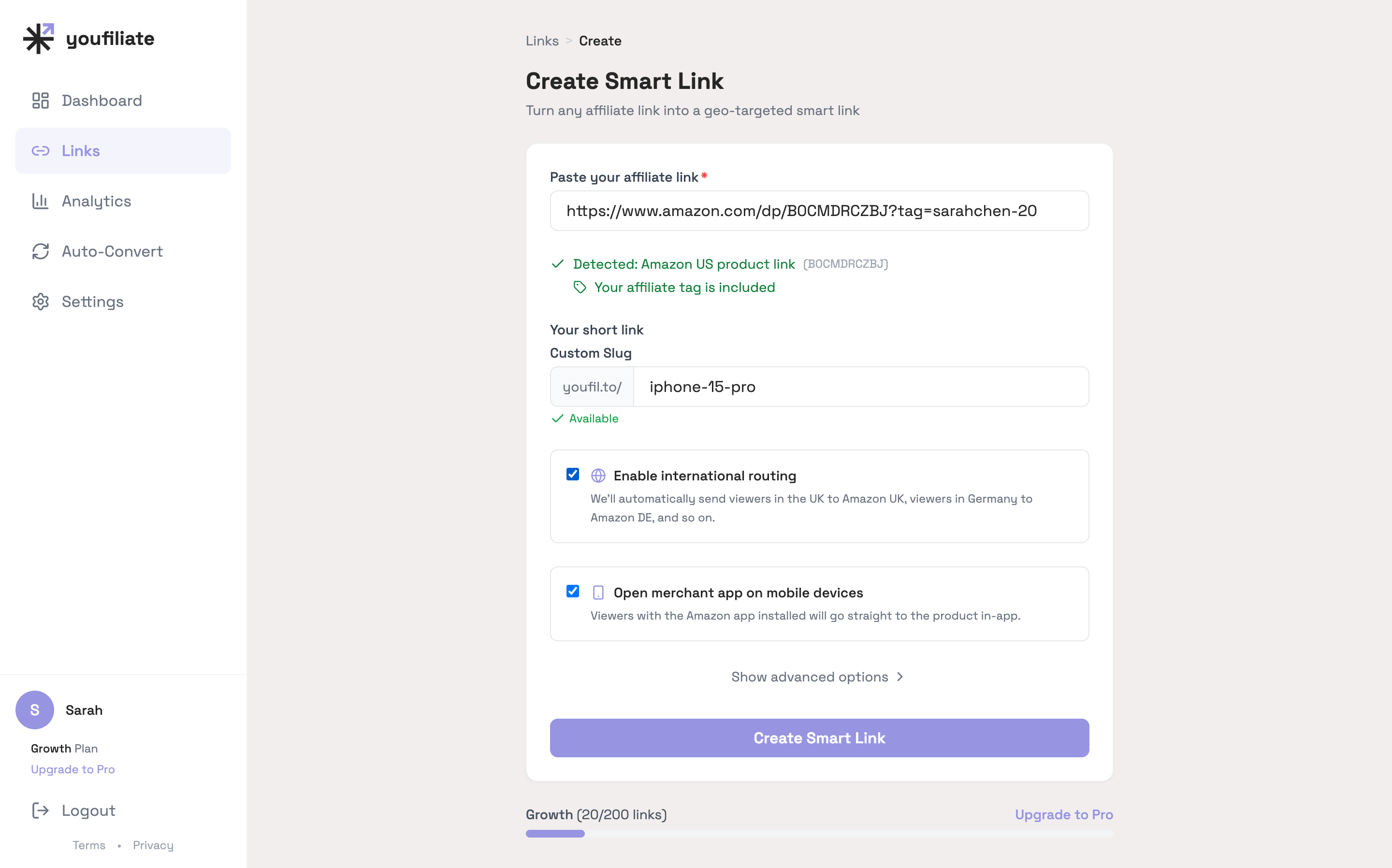
Paste the Amazon URL, name the slug, and the geo rules + iOS/Android deep links get pre-configured. The slow part of recreating a Geniuslink link is gone.
Copy Your New youfil.to Short URLs
As you create each link, save the new youfil.to short URL somewhere accessible. You need these in Step 2 to replace the old geni.us URLs in your video descriptions. A simple spreadsheet with two columns — old geni.us link and new youfil.to link — works perfectly.
Step 2 — Update Your YouTube Video Descriptions
This is the step where most creators expect hours of painful manual editing. Youfiliate’s auto-convert feature eliminates that.
Manual Approach (Small Channels)
If you have fewer than 20 videos with affiliate links, manual editing is straightforward:
- Open YouTube Studio
- Go to each video’s description
- Find every geni.us link
- Replace it with the corresponding youfil.to link from your spreadsheet
- Save the description
This works but does not scale. A channel with 200+ videos and multiple affiliate links per description is looking at a full day of copy-paste work.
One-Click Bulk Update with YouTube Auto-Convert
Youfiliate’s YouTube auto-convert feature replaces all your old affiliate links across every video description in a single action. Here is how it works:
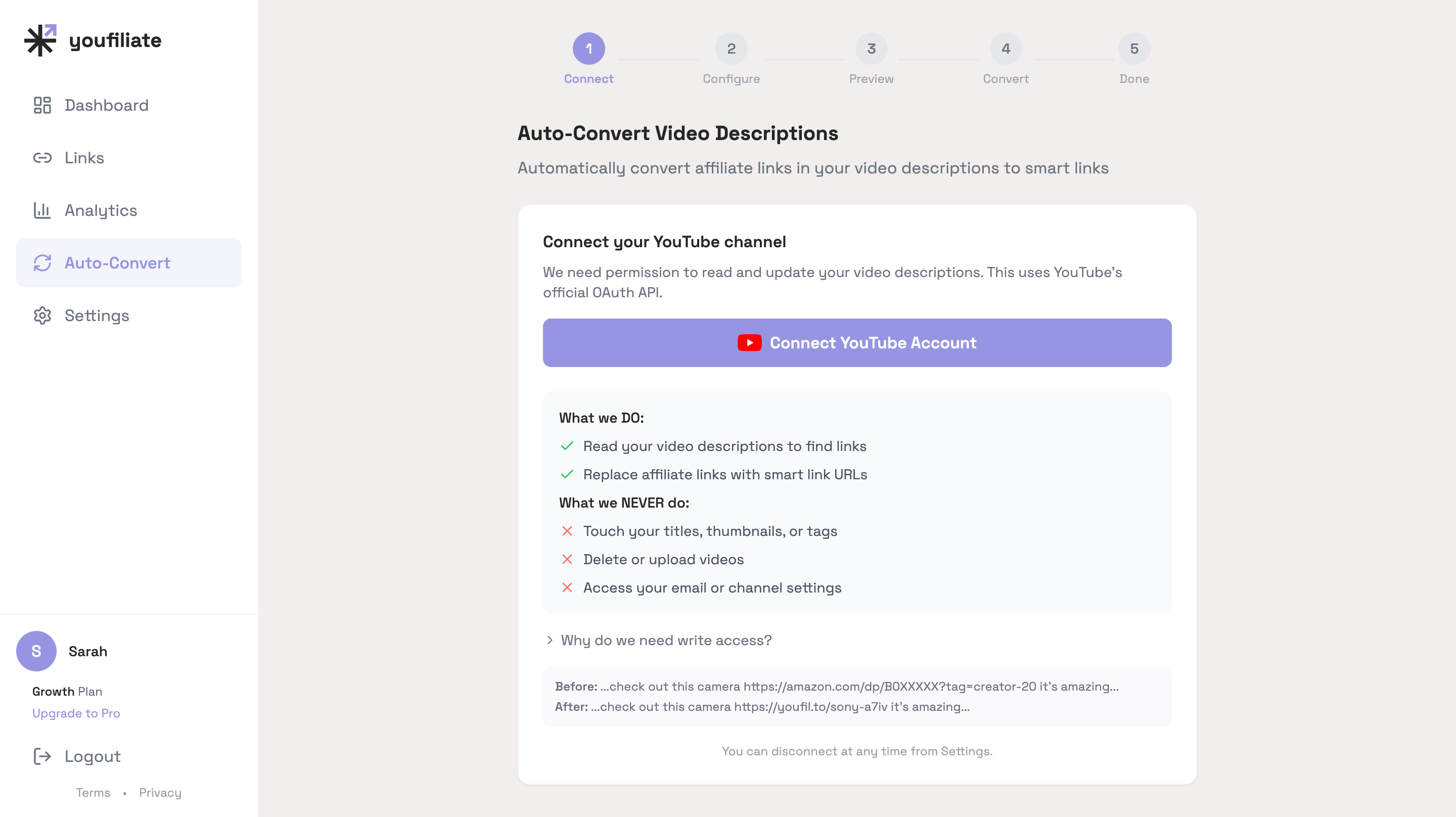
- Scans every video description on your connected YouTube channel
- Identifies all existing affiliate URLs (including geni.us links)
- Matches them to the smart links you created in Step 1
- Lets you preview every change before committing — nothing happens without your approval
- Replaces all matched links across all videos in a single action
- Supports full rollback if anything looks wrong after the update
This turns a multi-hour manual process into a few minutes of review-and-confirm. No other major smart link tool offers bulk YouTube description updates — it is built specifically for this migration use case.
For more on optimizing your YouTube descriptions for affiliate revenue, see YouTube affiliate link best practices.
Step 3 — Verify Your New Links Are Working
Do not skip verification. Spend 10 minutes confirming the migration worked before you cancel anything.
- Click each high-traffic youfil.to link and confirm it routes to the correct destination product page
- Test geo-routing — use a VPN set to a different country (UK and Germany are good test cases) and confirm the link sends you to the correct local storefront
- Test deep linking on mobile — tap a youfil.to link on your phone and confirm it opens the merchant’s app (Amazon, etc.) instead of the mobile browser
- Run a health check — Youfiliate runs automated 24/7 health checks on all your smart links, so if a destination URL goes dead in the future, you get alerted instead of silently losing commissions. Run a manual health check from your dashboard now to confirm a clean baseline.
If anything looks wrong, fix it before proceeding. Your Geniuslink account is still active, so no links are broken yet. You have time.
Step 4 — Cancel Your Geniuslink Account
Once every link is replaced and verified, you can safely close your Geniuslink account.
- Log in to Geniuslink
- Click your profile icon in the top-right corner
- Go to Account
- Select Close Account
- Pay any outstanding balance — Geniuslink blocks cancellation until your bill is cleared
Wait one full billing cycle after completing Steps 1-3 before canceling. Run both tools in parallel for a month. Watch your Youfiliate click analytics to confirm traffic is flowing through the new links. This gives you a safety window to catch any links you missed.
After cancellation, all geni.us links stop working permanently. There is no reactivation or recovery. Make sure you are done.
How Much Will You Save After Switching?
Creators who switch from Geniuslink to Youfiliate save between $144 and $1,824 per year depending on click volume, and the savings grow as your channel grows:
| Monthly Clicks | Geniuslink Cost | Youfiliate Cost | Monthly Savings | Annual Savings |
|---|---|---|---|---|
| 10,000 | $21 | $9 (Starter) | $12 | $144 |
| 50,000 | $101 | $19 (Growth) | $82 | $984 |
| 100,000 | $201 | $49 (Pro) | $152 | $1,824 |
The key difference is the pricing model itself. Geniuslink’s per-click pricing means your costs rise in lockstep with your audience. Youfiliate’s flat-rate pricing means a viral video or a growing subscriber base never increases your bill. You pay based on how many smart links you manage, not how many people click them.
At 100K monthly clicks, switching saves $1,824 per year. That is real money — enough to cover a new camera, a year of editing software, or simply more profit from the content you are already creating.
What I See Across Creator Migrations
Two patterns keep showing up when creators switch off Geniuslink:
- The 80/20 link rule. On most channels we’ve watched migrate, the top 20% of smart links generate roughly 80% of affiliate revenue. Migrate those first, verify, and you’ve protected the bulk of your income even if you never finish the long tail. The free Youfiliate tier (10 links) is sized for exactly this top slice.
- Geo-rule sprawl is overrated. Creators sometimes try to recreate all 19 Amazon storefronts that Geniuslink supports. On the actual click data we see across migrated channels, six well-configured geo rules (US default + UK, DE, JP, CA, AU, FR) cover ~85-90% of international clicks. The remaining 19 storefronts compete for the last 10% — usually not worth the setup time on day one.
The other thing creators underestimate: how much faster the recreation step is when ASIN auto-detection is doing the geo-rule setup. A Geniuslink-era smart link with seven country variants used to take 5-7 minutes per link to configure manually. The same link in Youfiliate is closer to 30 seconds.
Frequently Asked Questions
What happens to my geni.us links when I cancel Geniuslink?
All geni.us links stop working immediately when you close your Geniuslink account. There is no grace period, no forwarding, and no way to reactivate them. Every geni.us URL in every video description returns an error page instead of routing viewers to the product. This is why you must replace all geni.us links with your new youfil.to links before canceling. Youfiliate’s YouTube auto-convert handles this bulk replacement across all your video descriptions in minutes.
Can I export my links from Geniuslink?
No. Geniuslink does not offer a link export feature. There is no CSV download, no API endpoint for bulk extraction, and no migration tool. You recreate each smart link manually in your new tool. In Youfiliate, this takes about 30 seconds per link, and Amazon links get geo rules auto-suggested based on the product ASIN, which cuts the setup time significantly.
How long does it take to migrate from Geniuslink to Youfiliate?
The full migration takes 30-60 minutes for a creator with 20-25 smart links: roughly 20-30 minutes to recreate your smart links in Youfiliate, plus a few minutes to run the YouTube auto-convert feature for bulk description updates. Larger link libraries take proportionally longer for the recreation step, but the auto-convert step stays fast regardless of how many videos you have.
Is there a cheaper alternative to Geniuslink?
Youfiliate is the most cost-effective Geniuslink alternative for YouTube creators. It charges a flat monthly rate based on how many smart links you manage — $9/month for 50 links, $19/month for 200, $49/month for unlimited — instead of Geniuslink’s per-click pricing. At 50,000 monthly clicks, Youfiliate costs $19/month versus Geniuslink’s $101/month. Youfiliate also includes YouTube-specific features like auto-convert and health monitoring that Geniuslink does not offer.
How do I switch smart link providers without breaking my YouTube links?
The safe migration order is: create replacement smart links in your new tool first, update all video descriptions to use the new links second, verify everything works third, and cancel the old provider last. Never cancel your existing smart link provider before replacing every link. Use Youfiliate’s free tier to start the migration risk-free — once your channel is connected, the auto-convert preview shows every affiliate URL in your descriptions so you can spot broken or missing links before and after the switch.
Can I try Youfiliate before canceling Geniuslink?
Yes. Youfiliate’s free tier includes 3 smart links with no credit card required. Sign up, migrate a handful of your highest-traffic links first, run both tools in parallel for a week, and confirm that your new youfil.to links are routing correctly and tracking clicks. Once you are confident, upgrade to a paid plan, migrate the rest, and cancel Geniuslink. There is zero risk of downtime with this approach.
Ready to Switch from Geniuslink to Youfiliate?
Switching from Geniuslink to Youfiliate is not complicated — it just requires doing things in the right order. Recreate your links, bulk-update your descriptions with auto-convert, verify everything works, and cancel Geniuslink last. The entire process takes under an hour for most creators, and the flat-rate pricing saves hundreds or thousands of dollars per year depending on your traffic.
Ready to start? Create your free Youfiliate account at Youfiliate.com, connect your YouTube channel, and let the auto-convert preview tell you exactly which descriptions contain geni.us links you need to migrate. Migrate the first 3 smart links on the free plan today — no credit card, no commitment — and only upgrade once you’re confident the switch is clean.
You're losing commissions on every international click
Smart links route viewers to their local store automatically
Try It Free — 3 Smart LinksNo credit card required.
Done reading? Try it yourself
Create a geo-targeted smart link in 60 seconds
Start Free — No Credit Card3 smart links free forever. Unlimited clicks on every plan.