What Is Geo-Targeting for Affiliate Links? Why Every Creator Needs It
What Is Geo-Targeting for Affiliate Links? Why Every Creator Needs It
Last updated: March 2026
The bottom line: Geo-targeting automatically routes each click on your affiliate link to the viewer’s local store — US viewers go to amazon.com, UK viewers to amazon.co.uk, German viewers to amazon.de. Without it, a UK viewer clicking your amazon.com link either bounces off a foreign store or gets redirected without your affiliate cookie. Over 40% of internet traffic comes from outside the US, which means creators without geo-targeting are losing commissions on nearly half their clicks.
If you put an Amazon affiliate link in your YouTube description, your blog, or your Instagram bio, you’re probably linking to amazon.com. That works perfectly for your US viewers. But what about the viewer in London? Or Berlin? Or Tokyo?
When a UK viewer clicks your amazon.com link, one of a few things happens — and none of them are good for your earnings. Here’s what geo-targeting is, why it matters, and how to set it up.
What Is Geo-Targeting for Affiliate Links?
Geo-targeting is a technique where a single link automatically detects the viewer’s location and redirects them to the appropriate destination. For affiliate links, this typically means routing each click to the viewer’s local Amazon store or regional merchant.
Instead of pasting a raw amazon.com link that only works for US viewers, you use a geo-targeted smart link. When someone clicks it:
- A viewer in the US goes to amazon.com with your US affiliate tag
- A viewer in the UK goes to amazon.co.uk with your UK affiliate tag
- A viewer in Germany goes to amazon.de with your DE affiliate tag
- A viewer in Japan goes to amazon.co.jp with your JP affiliate tag
The viewer sees the same product (or the closest equivalent) in their local store, in their local currency, with their local Prime benefits. Your affiliate cookie is properly set for that store. Everyone wins.
What Happens Without Geo-Targeting?
Without geo-targeting, every international click on your affiliate link is a potential lost commission. Here’s what actually happens when a UK viewer clicks your amazon.com link:
Scenario 1: They land on amazon.com. The viewer sees prices in USD, shipping costs are high or unavailable to the UK, and they probably leave without buying. Even if they do buy, you earn a commission — but they’re far less likely to purchase from a foreign store. Conversion rates drop dramatically.
Scenario 2: Amazon redirects them to amazon.co.uk. Amazon sometimes automatically redirects international visitors to their local store. The problem? The redirect strips your affiliate tag. The viewer buys the product on amazon.co.uk, but you don’t get credited because your amazon.com Associate tag doesn’t work on the UK store.
Scenario 3: The product doesn’t exist on their local store. Not every product is available in every Amazon marketplace. The viewer lands on amazon.com, sees a product they can’t easily buy, and leaves. No sale, no commission, and a frustrated viewer.
In all three scenarios, you did the work of creating the content, building the audience, and earning the click. The last step — converting that click into a commission — fails because the link wasn’t built for a global audience.
How Much Revenue Do Creators Lose Without Geo-Targeting?
The numbers are significant. Over 40% of internet traffic comes from outside the United States, and for many YouTube creators, the international share is even higher. Gaming, tech, and entertainment content routinely sees 50-70% international viewership.
Let’s work through a realistic example:
A creator with 100,000 monthly views earns $2,000/month from Amazon affiliate links. If 45% of their audience is international and none of those clicks convert (because the links aren’t geo-targeted), they’re losing roughly $900/month — over $10,000 per year — from clicks that could have earned commissions if routed to the right store.
Even if some international clicks still convert on amazon.com (because some international viewers do buy from the US store), conversion rates are typically 3-5x lower for international visitors on a domestic store compared to their local store. The math is clear: geo-targeting directly increases your affiliate revenue.
This is separate from broken affiliate links, which is another source of silent revenue loss. Geo-targeting addresses the international problem; link health monitoring addresses the broken link problem. Ideally, you solve both.
How Does Geo-Targeting Work Technically?
When a viewer clicks a geo-targeted link, the link service checks the viewer’s IP address to determine their country. Based on that country, the service redirects them to the appropriate destination URL — each with the correct regional affiliate tag.
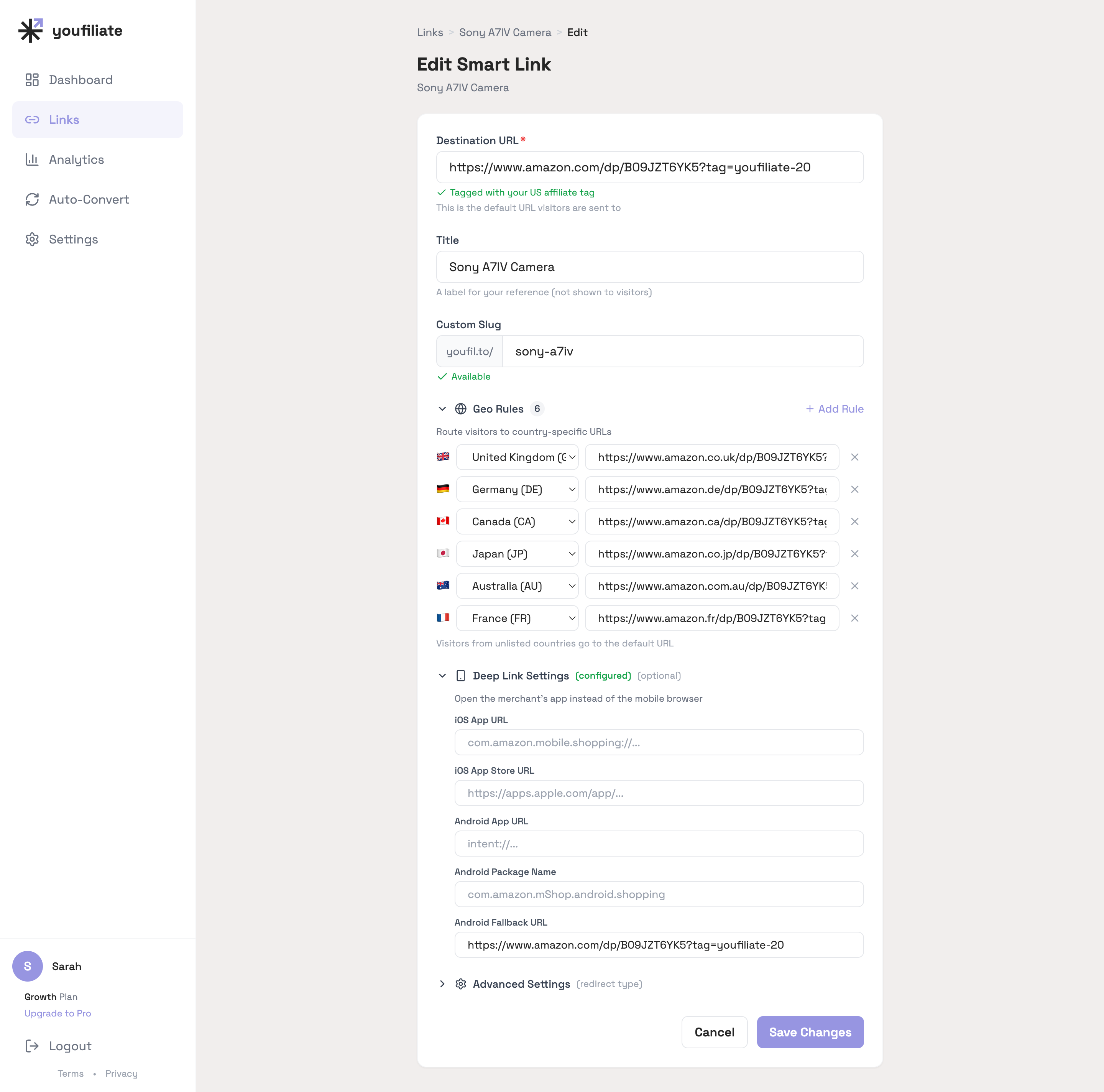
What a configured geo-targeted link actually looks like in a smart link tool: each row maps one country to one destination URL. The dropdown handles country selection, the URL field accepts any local-storefront link, and the deep-link panel below it controls whether mobile viewers in those countries open the merchant app or the mobile browser.
For Amazon specifically, this means you need affiliate accounts in multiple Amazon marketplaces. Amazon runs separate affiliate programs for each country:
- Amazon.com — US (Amazon Associates)
- Amazon.co.uk — UK
- Amazon.de — Germany
- Amazon.fr — France
- Amazon.co.jp — Japan
- Amazon.ca — Canada
- Amazon.com.au — Australia
- And many more
You sign up for each country’s program separately and get a unique affiliate tag for each. A geo-targeting tool maps your smart link to the correct product URL and tag for each store.
If a viewer is in a country where you don’t have an affiliate account (or where the product isn’t available), the tool typically falls back to your default store — usually amazon.com.
Do I Need to Join Every Amazon Associates Program?
No. Start with the countries that make up the largest share of your audience. For most English-language creators, that’s:
- US (amazon.com) — your primary store
- UK (amazon.co.uk) — typically the second-largest English-speaking audience
- Canada (amazon.ca) — significant for North American creators
- Germany (amazon.de) — largest European Amazon marketplace
- Australia (amazon.com.au) — growing market
You can check your YouTube Analytics under “Geography” to see exactly where your viewers are. Focus on the top 3-5 countries first. Each Amazon Associates program has a similar signup process — the auto-localization guide walks through how to wire those international tags into a single smart link.
Some geo-targeting tools also support Amazon’s OneLink program, which simplifies the multi-marketplace setup. But dedicated smart link tools typically offer more control and better analytics.
Does Geo-Targeting Only Work for Amazon?
No. While Amazon is the most common use case because of its marketplace-per-country structure, geo-targeting works with any affiliate program or destination. Common use cases include:
- Amazon — Route to local Amazon stores (the most impactful use case)
- Software products — Route to region-specific pricing pages or local resellers
- Physical products with regional distributors — Send US viewers to the brand’s US store and EU viewers to the EU store
- App stores — Route to the correct App Store or Google Play region
- Any merchant with regional sites — Booking.com, eBay, and many retailers have country-specific domains
Even for non-Amazon links, geo-targeting can improve conversion rates by showing viewers content in their local language and currency.
What Tools Offer Geo-Targeting for Affiliate Links?
Several tools handle geo-targeting, each with different approaches and pricing:
Youfiliate Smart Links — Paste any affiliate link and get back a geo-targeted smart link (youfil.to/your-link) that routes clicks to local stores. Also includes deep linking (opens apps instead of browsers), link health monitoring, and click analytics with country breakdowns. Free tier includes 10 smart links with unlimited clicks. Paid plans start at $9/month.
Geniuslink — One of the earliest geo-targeting tools for affiliate links. Strong Amazon support with automatic product matching across stores. Pricing is per-click ($5 per 1,000 clicks), which can get expensive at scale. No free tier. See our detailed comparison.
Amazon OneLink — Amazon’s own free geo-targeting solution. It automatically redirects Amazon links to the viewer’s local store. The main limitations are that it only works for Amazon links, requires you to join each country’s Associates program, and provides limited analytics. It also doesn’t offer short branded URLs, deep linking, or health monitoring.
LinkTwin — Offers geo-targeting on paid plans with a focus on deep linking. Free tier available but capped at 500 clicks per month.
For a broader comparison across smart link tools, see the full smart links guide.
How Do I Set Up Geo-Targeting for My Affiliate Links?
The simplest approach is to use a smart link tool. Here’s the general process:
- Sign up for affiliate programs in your top viewer countries (check YouTube Analytics → Geography)
- Create a smart link — paste your US affiliate URL into a tool like Youfiliate
- Add regional destinations — map each country to its local product URL with the correct affiliate tag
- Replace your old links — swap the raw amazon.com URLs in your descriptions with the smart link
If you have a lot of existing videos, tools with YouTube auto-convert can update all your descriptions at once instead of editing each video manually. This is especially valuable for creators with large back catalogs — the full smart links guide covers the auto-convert flow in detail.
Going forward, use your smart link in every new video. Since it’s a single URL that routes intelligently, you paste the same link everywhere — YouTube descriptions, blog posts, social bios, emails — and it works for every viewer regardless of location.
Does Geo-Targeting Affect My Amazon Affiliate Cookie?
Yes, and this is one of the most important reasons to use it. Amazon’s 24-hour cookie — which earns you a commission on everything a viewer buys in that session — only works within a single Amazon store.
If a UK viewer clicks your amazon.com link and somehow ends up on amazon.co.uk through Amazon’s own redirect, your US affiliate cookie doesn’t transfer. The viewer might buy $500 worth of products on amazon.co.uk, and you earn nothing because the cookie was set on the wrong store.
With geo-targeting, the UK viewer goes directly to amazon.co.uk with your UK affiliate tag. The cookie is set on the correct store from the first click. Everything they buy in the next 24 hours on amazon.co.uk earns you a commission.
This is the same 24-hour cookie mechanism that makes Amazon so valuable for affiliates — but it only works when the viewer lands on the right store with the right tag. The Amazon auto-localization guide goes into how to make sure the cookie is set on the correct local store every time.
Can I See Which Countries My Affiliate Clicks Come From?
With raw Amazon links, you have limited visibility. Amazon Associates shows you total clicks and earnings, but the geographic breakdown is basic.
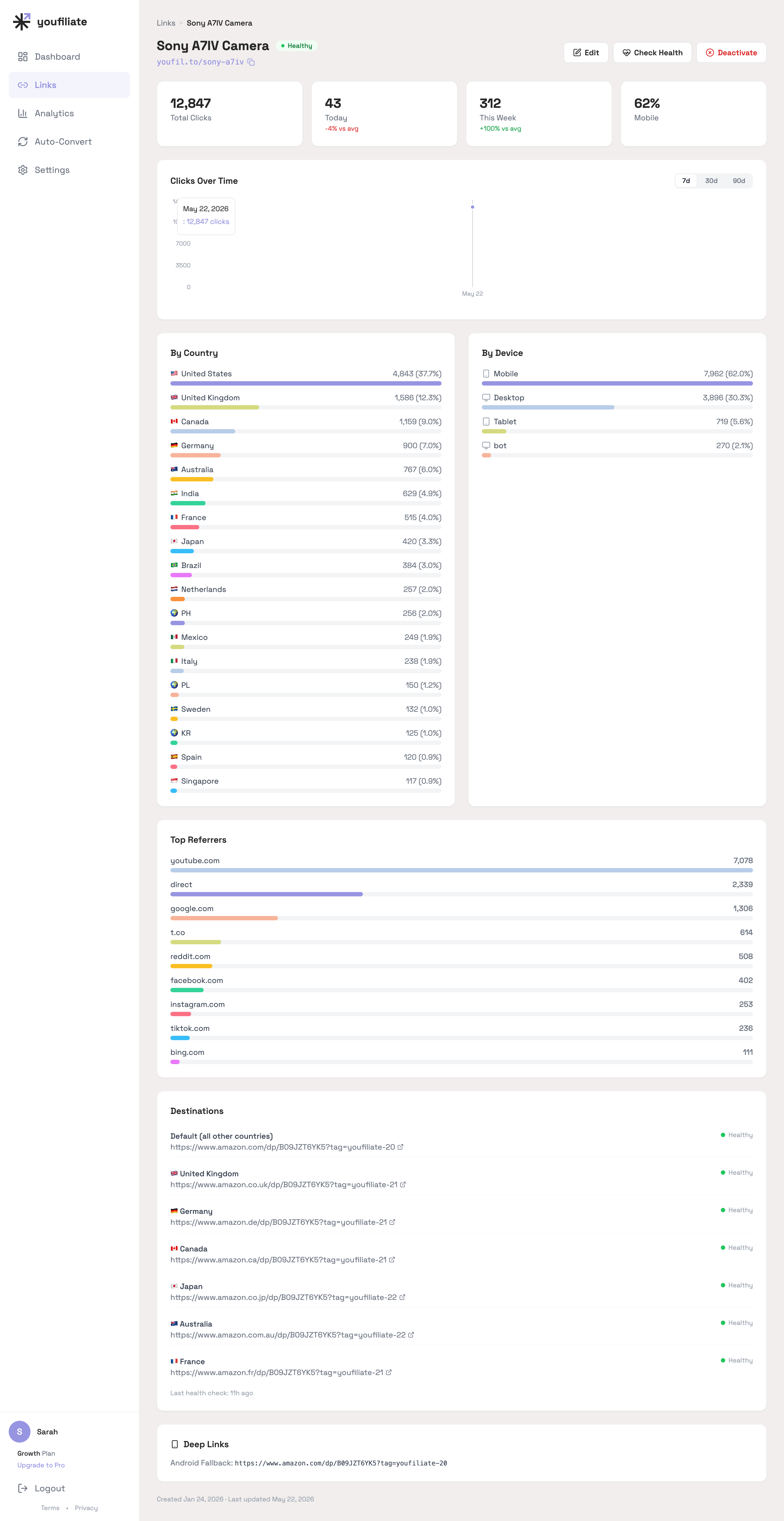
Per-link country breakdowns at this level of granularity are the data you need to know which Amazon Associates programs are actually worth joining. If 4% of your clicks come from India but you don’t have an Amazon.in tag, the country share is telling you something specific.
Smart link tools with analytics show you exactly where your clicks originate — by country, device, and often by referrer (which video or page sent the click). This data helps you:
- Decide which Amazon programs to join — If 15% of your clicks come from Germany but you don’t have a German Associates account, that’s a clear signal to sign up
- Understand your audience — Geographic click data reveals your actual buyer demographics, not just your viewer demographics
- Optimize content — If certain videos drive more international clicks, you can create more content targeting those audiences
This is data you simply don’t get from raw affiliate links or even from Amazon’s own dashboard.
Is Geo-Targeting Worth It for Small Channels?
Yes, if you have any international audience at all. The question isn’t channel size — it’s audience geography. A channel with 5,000 subscribers where 30% of viewers are international is leaving money on the table just like a channel with 500,000 subscribers.
The math scales linearly. If geo-targeting recovers even one additional sale per month from international viewers, a tool with a free tier pays for itself immediately. And since most creators underestimate their international audience (because they’ve never had the data to see it), the impact is often larger than expected.
Start with a free tool to see the data. Once you know what percentage of your clicks come from outside your home country, you can decide whether to invest in a paid plan with more smart links.
Frequently Asked Questions
What is geo-targeting for affiliate links?
Geo-targeting automatically detects a viewer’s country when they click your affiliate link and redirects them to the appropriate local store — for example, routing UK viewers to amazon.co.uk and German viewers to amazon.de instead of everyone landing on amazon.com. This ensures the correct affiliate cookie is set for each viewer’s local store.
Why do I need geo-targeting for Amazon affiliate links?
Without geo-targeting, international viewers clicking your amazon.com link either land on a foreign store (low conversion), get redirected without your affiliate tag (no commission), or find the product unavailable in their region. Over 40% of internet traffic is international, so you’re potentially losing commissions on nearly half your clicks.
How much more money can I make with geo-targeted affiliate links?
The increase depends on your international audience share. A creator with 45% international viewership who adds geo-targeting can see a 20-40% increase in total affiliate revenue, since those clicks were previously converting at near-zero rates. Even creators with 20% international traffic typically see a meaningful lift.
Does Amazon OneLink do the same thing as geo-targeting tools?
Amazon OneLink offers basic geo-targeting for Amazon links — it redirects viewers to their local Amazon store. However, it only works for Amazon links (not other affiliate programs), provides limited analytics, and doesn’t offer features like branded short URLs, deep linking, or link health monitoring. Dedicated tools like Youfiliate or Geniuslink offer more control and work with any affiliate network.
Do I need separate Amazon affiliate accounts for each country?
Yes. Amazon runs separate Associates programs for each marketplace (US, UK, Germany, etc.). You need to sign up individually for each country where you want to earn commissions. Start with your top 3-5 viewer countries based on your YouTube Analytics geography data.
Can I use geo-targeting on platforms other than YouTube?
Yes. Geo-targeted smart links work anywhere you can paste a URL — YouTube descriptions, blog posts, Instagram link-in-bio, TikTok bios, email newsletters, Twitter/X posts, and anywhere else. The same link works for every viewer on every platform.
Does geo-targeting affect Amazon’s 24-hour cookie?
Yes, positively. Amazon’s 24-hour cookie only works within a single store. Without geo-targeting, international viewers may land on the wrong store and the cookie is either not set or set on a store they won’t buy from. With geo-targeting, each viewer’s cookie is set on their local store, where they’re most likely to make a purchase.
What is the difference between geo-targeting and deep linking?
Geo-targeting routes clicks to the correct regional store based on the viewer’s country. Deep linking routes clicks to a mobile app instead of a web browser when the viewer is on a phone. They solve different problems — geo-targeting handles international audiences, deep linking handles mobile conversion — and the best smart link tools combine both.
How do I check if geo-targeting is working on my links?
Use a VPN to test from different countries. Set your VPN to the UK and click your geo-targeted link — you should land on amazon.co.uk with your UK affiliate tag in the URL. Repeat for other countries you’ve configured. Most smart link tools also show geographic click breakdowns in their analytics dashboard.
Is geo-targeting the same as link localization?
They’re closely related. Geo-targeting refers to the technical routing based on location. Link localization is the broader concept of ensuring the destination content (language, currency, product availability) matches the viewer’s region. Geo-targeting is the mechanism that enables link localization for affiliate links.
Can geo-targeting work with non-Amazon affiliate links?
Yes. Any affiliate program with regional destinations benefits from geo-targeting — software with regional pricing, physical products with local distributors, booking sites with country-specific domains, and more. The technique works with any URL, not just Amazon.
What happens if a product isn’t available in the viewer’s local Amazon store?
Most geo-targeting tools let you configure fallback behavior. Common options include: redirecting to a search results page on the local store, falling back to your default store (usually amazon.com), or showing an alternative product. The best approach depends on the product and your audience.
How do I know what percentage of my audience is international?
Check YouTube Studio → Analytics → Audience → Geography. This shows you exactly which countries your viewers are in. For website traffic, Google Analytics provides the same data. Most creators are surprised to find that 30-50% of their audience is outside their home country.
Do I need to disclose geo-targeted affiliate links differently?
No. The same FTC disclosure requirements apply regardless of whether your links are geo-targeted. A standard affiliate disclosure (“This description contains affiliate links — I earn a small commission if you buy through them, at no extra cost to you”) covers geo-targeted links just like regular affiliate links.
What I See in Geo-Distribution Data
A few patterns from watching real click data flow through geo-targeted smart links:
- The long tail is longer than you think. On a single tech-product smart link (Sony A7IV) with 12,847 clicks, the visible country list extends from US (37.7%) down to Singapore (0.9%). The tail past the top 5 still represents ~28% of revenue if those clicks land on the right local storefront.
- Non-Anglophone markets show up immediately. Philippines, Mexico, Italy, Poland, Korea, and Singapore each contribute 1-2% individually. None justify joining a new Amazon Associates program on their own, but the seven countries Youfiliate auto-suggests (US, UK, DE, JP, CA, AU, FR) already cover ~85-90% of those long-tail clicks because those Amazon storefronts ship globally to most of the remaining countries anyway.
- Mobile is dominant everywhere — but more so internationally. US clicks are 56% mobile in our data; outside the US, mobile share jumps to 70%+ on average. Deep linking matters most in exactly the markets where your geo-rules are doing the most work.
Want to see how many of your clicks come from international viewers? Start free with 10 smart links at Youfiliate.com and get country-level click analytics on every link.
You're losing commissions on every international click
Smart links route viewers to their local store automatically
Try It Free — 10 Smart LinksNo credit card required.
Done reading? Try it yourself
Create a geo-targeted smart link in 60 seconds
Start Free — No Credit Card10 smart links free forever. Unlimited clicks on every plan.