How to Create Your First Smart Link (Affiliate Setup in Under 60 Seconds)
To create a smart link for affiliate marketing, paste your affiliate URL into Youfiliate, a smart links platform that turns any affiliate link into a geo-targeted, app-opening short URL. Confirm the auto-suggested geo rules for your target countries, copy your branded youfil.to short URL, and you have a single link that routes every viewer to their local store. The entire process takes under 60 seconds.
TL;DR: Creating a smart link is faster than most creators expect. Paste your affiliate URL, review the geo rules Youfiliate auto-generates based on the product, customize your branded youfil.to short URL, and drop it into your YouTube description. Every international viewer now lands in the right store instead of getting bounced to amazon.com.
If you search “how to create a smart link” right now, you’ll find page after page of CPA network content about traffic rotation and postback URLs. None of that applies to you. You’re a YouTube creator who wants a single link that sends your UK viewers to Amazon UK, your German viewers to Amazon DE, and your American viewers to Amazon US. This tutorial walks through exactly that — four steps, no fluff.
What Your Smart Link Will Do When It’s Live
A smart link is a single URL that detects each viewer’s country and routes them to the correct Amazon storefront (or any merchant’s local store). Your finished youfil.to link will do three things automatically: geo-route clicks to the right storefront, open the Amazon app on mobile through deep linking instead of dumping viewers into a mobile browser, and monitor every destination URL for broken links 24/7 so you find out before your audience does.
What You Need Before You Start
Before you create your first smart link, gather these three things:
- Your primary affiliate link — the Amazon Associates, impact.com, ShareASale, or CJ link you already use. Any affiliate URL works.
- Your international affiliate IDs — if you’ve joined Amazon Associates programs in other countries (UK, CA, DE, AU, JP, FR), have those tracking IDs handy. Don’t have them yet? Here’s how to auto-localize Amazon affiliate links with international accounts.
- A Youfiliate account — the free plan covers 3 smart links with unlimited clicks. No credit card required.
That’s it. No plugins to install, no DNS records to configure, no code to write.
Step 1 — Paste Your Affiliate URL
Log into Youfiliate and click Create Smart Link. Paste your raw affiliate URL into the link field — the full Amazon Associates URL, not a shortened amzn.to link.
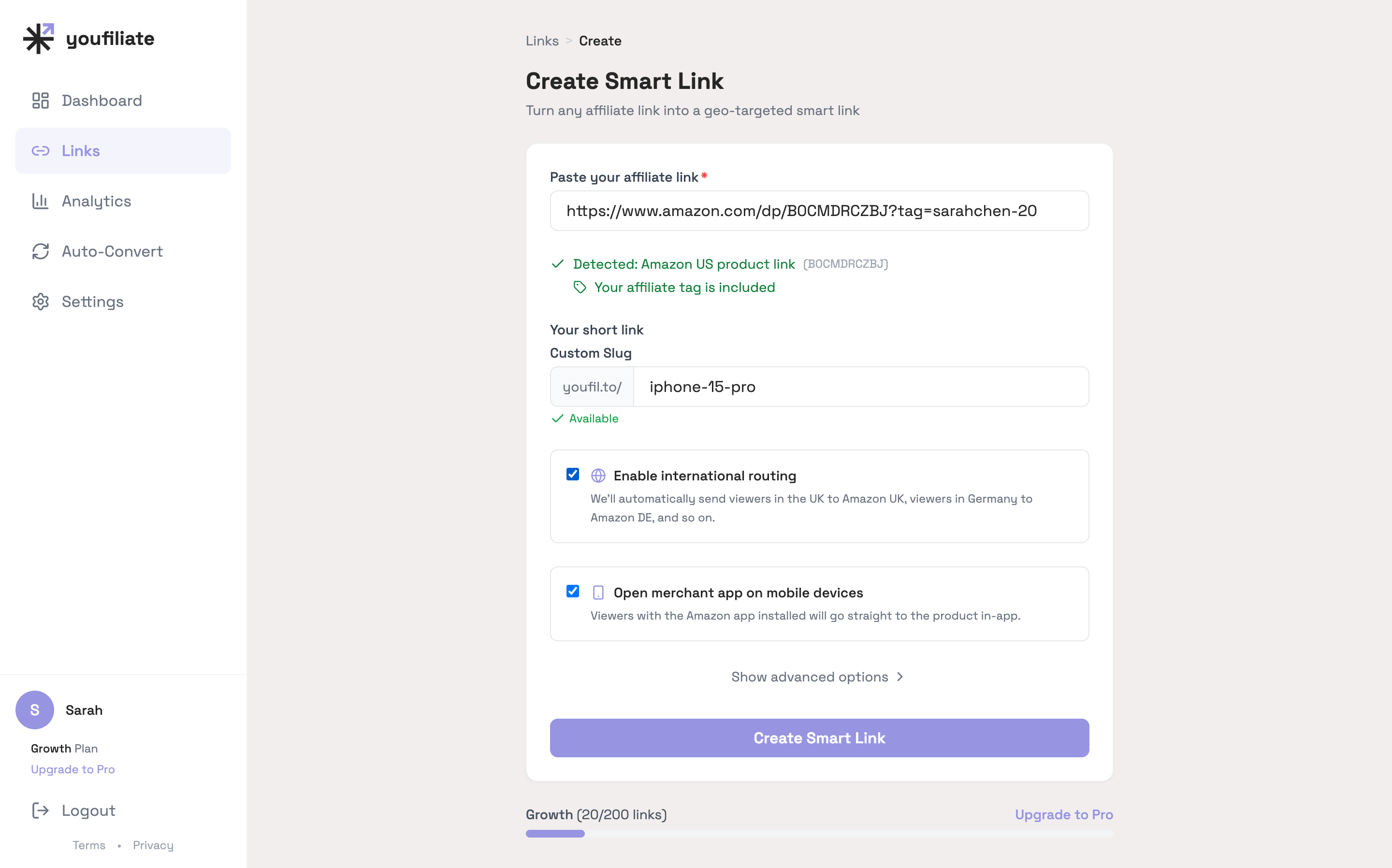
Youfiliate auto-detects the merchant immediately. For Amazon links, it extracts the ASIN (the unique product identifier buried in that long URL) and uses it to generate geo-targeting suggestions for six international storefronts in the next step. You don’t need to configure anything manually or tell the tool which merchant you’re linking to. Paste the URL and it handles the rest.
This works with any affiliate network. Paste a ShareASale link, an impact.com link, a CJ deep link — the smart link creation flow is the same. The auto-detection and ASIN extraction are specific to Amazon, but the branded short URL, click analytics, and health monitoring apply to every network.
Step 2 — Review and Confirm Your Geo Rules
After pasting your URL, Youfiliate presents a set of suggested geo-targeting rules. For Amazon links, these are pre-populated based on the ASIN it extracted, covering six international storefronts: Amazon UK, CA, DE, AU, JP, and FR.
Each geo rule maps a country to a destination URL. Here’s what to do:
- Review each suggested country. Youfiliate generates the correct Amazon product page URL for each storefront automatically.
- Add your affiliate tracking ID for each country where you have an Amazon Associates account.
- Remove any countries where you don’t have an affiliate account. Viewers from those countries will fall through to your default URL (your US Amazon link).
- Add custom rules if you need them — for example, routing Spanish viewers to Amazon ES.
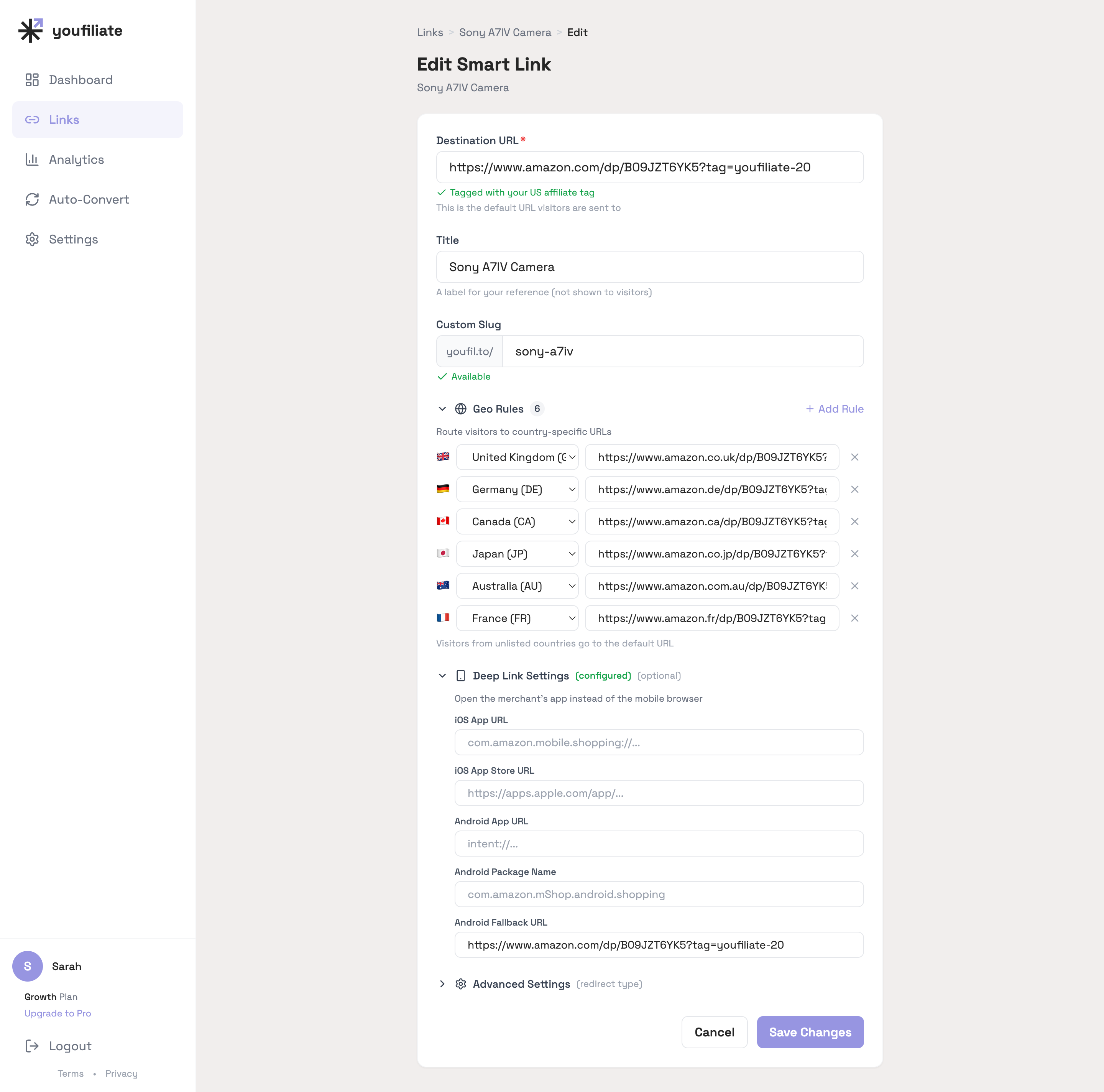
Each row is one country. The dropdown lets you pick from the full country list, the URL field accepts any destination, and the Deep Link Settings panel (visible below the geo rules) controls what happens on mobile.
The default URL is your fallback. Any viewer whose country doesn’t match a geo rule gets sent there. For most YouTube creators, this is their US Amazon Associates link.
If you already know what smart links are and how they work, this step is intuitive. If not, the short version: instead of one link pointing to one store, you now have one link that points to the right store for each viewer’s location. A UK viewer clicking your youfil.to link lands on amazon.co.uk. A Japanese viewer lands on amazon.co.jp. Everyone else lands on amazon.com.
Step 3 — Customize Your Branded Short URL
Every smart link gets a youfil.to/[slug] short URL. Youfiliate auto-generates a slug, but you should customize it to match the product.
Pick a slug that matches the product name. If you’re linking to the Sony WH-1000XM5, use youfil.to/sony-wh1000xm5. If it’s a generic “my gear” link, use youfil.to/my-headphones or youfil.to/gear-headphones.
Good slugs matter for two reasons:
- Trust. A viewer scanning your YouTube description sees
youfil.to/sony-wh1000xm5and knows exactly where they’re going. Compare that toamzn.to/3xR7qPz— it could be anything. - Reusability. A clean, memorable slug works across YouTube descriptions, newsletter links, Instagram bios, and pinned comments. One link for every platform.
Hit Create and your smart link is live. Copy the youfil.to URL — you’re ready for the final step.
Step 4 — Add the Link to Your YouTube Description (and Everywhere Else)
Drop your new youfil.to smart link into your YouTube video description. Where you place it directly affects how many viewers click. Follow these placement rules:
- First two lines of the description. These are visible without clicking “Show more.” Your affiliate link should live here, especially for product reviews and recommendations.
- Pinned comment. Duplicate the link in a pinned comment for extra visibility. YouTube does not penalize this.
- Channel bio links. Add your most important smart links to your channel’s About section or link shelf.
Always include an affiliate disclosure next to the link — something like “As an Amazon Associate I earn from qualifying purchases.” YouTube requires this, and the FTC guidelines on affiliate disclosures are clear that disclosures must be conspicuous and close to the link.
Here’s the real power of a smart link: the youfil.to URL you just created works everywhere. The same link goes in your blog posts, email newsletters, social media bios, and community posts. If the product goes out of stock or you want to swap the destination, you update it once inside Youfiliate and every platform where you’ve shared the link automatically points to the new destination. For more context on how smart links sit in the broader affiliate stack, check out the smart links guide.
What Happens After a Click (And Why It Matters)
Understanding the redirect path shows what your smart link does behind the scenes every time a viewer clicks:
- A viewer in Germany clicks your youfil.to link.
- Youfiliate checks the viewer’s country using Cloudflare’s edge network — no latency-adding API calls.
- The geo rule for Germany matches — the viewer is redirected to the Amazon DE product page with your German affiliate tracking tag.
- If the viewer is on mobile, deep linking opens the Amazon app directly instead of the mobile browser, which increases conversion rates because viewers are already signed into the app.
- Youfiliate logs the click with country, device, and referrer data. No personally identifiable information is stored — IP addresses are hashed daily for GDPR compliance.
All of this happens in milliseconds. The viewer never sees a loading screen or interstitial page.
Behind the scenes, Youfiliate also runs 24/7 health monitoring on your smart link. If the product gets delisted, the URL structure changes, or any geo rule destination starts returning errors, you get notified before your audience starts hitting dead pages. If you’ve ever lost commissions to broken affiliate links, you know how valuable that is.
Frequently Asked Questions
How long does it take to create a smart link?
Under 60 seconds for a standard affiliate link with auto-suggested geo rules. If you need to look up your international Amazon Associates tracking IDs, budget 2-3 minutes. The actual creation flow — paste URL, confirm geo rules, copy branded short link — is faster than writing the YouTube description you’ll paste it into.
Do I need Amazon Associates accounts in every country to use geo-targeting?
No. You only need an Associates account in each country where you want to earn commissions. For countries where you don’t have an account, Youfiliate routes the click to your default URL instead, so international viewers still land on a working product page rather than a 404 or wrong storefront. Start with the US, UK, and Canada — those three markets cover the majority of English-speaking YouTube audiences.
What’s the difference between a smart link and just using amzn.to?
An amzn.to link always sends every viewer to amazon.com regardless of their location. A UK viewer clicking your amzn.to link lands on the US store where your UK affiliate tag does not work — you earn zero commission on that sale. A smart link detects the viewer’s country and routes them to their local Amazon storefront with the correct tracking ID attached. For a deeper breakdown, read the full smart links guide.
How much does a smart link tool cost?
Youfiliate’s free plan includes 3 smart links with unlimited clicks. Paid plans start at $9/month for 25 links (14-day free trial), scaling to $49/month for unlimited links — all flat-rate with no per-click fees. This matters because Geniuslink, a per-click smart link service and the main alternative, charges approximately $5 per 1,000 clicks, which adds up fast once a video gains traction. Flat-rate pricing means your costs stay the same whether you get 1,000 clicks or 100,000.
Can I use smart links for affiliate networks other than Amazon?
Yes — any affiliate URL works with Youfiliate. Paste a ShareASale, impact.com, CJ, or direct merchant link and you get the branded youfil.to short URL, click analytics, health monitoring, and deep linking. Geo rules are most powerful for Amazon because of the separate international storefronts, but the branded short URL and mobile deep linking features add value for every affiliate network.
How do I add a smart link to my YouTube description?
Copy your youfil.to URL and paste it directly into your video’s description field in YouTube Studio. Place it in the first two lines so it’s visible without viewers clicking “Show more.” Include an affiliate disclosure nearby. The same smart link works in pinned comments, channel bio links, community posts, and any other platform where you share links.
Can I create smart links without using the dashboard?
Yes. The Youfiliate MCP server lets you create, list, and analyse smart links directly from Claude, ChatGPT, Cursor, or any MCP-compatible client. Paste an affiliate URL into chat, ask the assistant to create a smart link with geo rules for your top markets, and the link comes back ready to drop into a YouTube description — useful for batch-creating links across a back catalog without context-switching to the web UI.
What I See After Watching Creators Set Up Smart Links
A pattern across new accounts: the geo-rule step is where most creators stop and the deep-link step is where most leave revenue on the table. Two specific things to do differently:
- Turn on deep linking on day one. It’s a single toggle, and across our demo dataset 62% of clicks are mobile. If you skip it, you’re sending two-thirds of your viewers into a mobile browser when the Amazon app was one tap away.
- Don’t overthink the geo rules. Six rules — UK, DE, JP, CA, AU, FR — cover roughly 85-90% of international clicks for English-language YouTube. Add custom rules later if your analytics show real traffic from countries you didn’t expect (Brazil, the Netherlands, and Singapore are the usual surprises).
The “create” flow finishes in under 60 seconds. The bigger upside comes from auto-converting your existing back catalog in one pass once your first link is live and verified.
Your first smart link takes less than a minute to create, but the impact compounds with every video. International viewers who used to bounce off your US-only Amazon link now land in their local store, earning you commissions on traffic you were already generating.
Start free with 3 smart links at Youfiliate.com — no credit card required.
You're losing commissions on every international click
Smart links route viewers to their local store automatically
Try It Free — 3 Smart LinksNo credit card required.
Done reading? Try it yourself
Create a geo-targeted smart link in 60 seconds
Start Free — No Credit Card3 smart links free forever. Unlimited clicks on every plan.