Automated YouTube Video Production Pipeline: A Developer's End-to-End Guide (Python + APIs)

Andrew Pierce ·
youtube automation python AI video pipeline MCP server affiliate automation developer guide ffmpeg elevenlabs claude api

An automated YouTube video production pipeline is a code-driven Python system that turns a topic input into an uploaded, monetized video without human intervention by chaining APIs for topic research, script generation, voiceover, visuals, assembly, thumbnail creation, upload, and affiliate link insertion. Built correctly, it costs $7–20/month in API fees at three videos per week and gives you total programmatic control over metadata, descriptions, and monetization — including the one stage every other guide skips: minting geo-targeted smart links so international viewers reach the right Amazon storefront.

TL;DR: A complete automated YouTube video production pipeline has nine stages — topic research, script generation, voiceover, visuals, assembly, thumbnail, upload, affiliate link creation, and an analytics feedback loop. Every developer guide online stops at stage 7 (upload). The missing step is stage 8: programmatically minting geo-targeted smart links so international viewers reach the right Amazon storefront and you actually earn the commissions you’d otherwise lose. Youfiliate, a Smart Links platform for YouTube creators that turns affiliate URLs into geo-targeted, app-opening short links (youfil.to), ships an MCP server (pip install youfiliate-mcp) and a REST API that wire this in with one function call per video.

This guide is written for developers who already know what they’re doing — comfortable with Python, REST APIs, async tasks, and the trade-offs between self-hosting FFmpeg and calling a managed video API. If you’re looking for a no-code Make.com walkthrough, this isn’t it. If you’re building a cron-triggered pipeline that runs while you sleep, keep reading.

Why Developers Should Build This (Not Buy It)

Custom pipelines beat off-the-shelf YouTube automation tools on cost, control, and extensibility. Off-the-shelf tools — Invideo AI, Pictory, Synthesia — cost $30–$100/month and treat you like a marketing department: you can’t customize the description payload, you can’t programmatically inject a smart link, and you can’t run analytics-driven A/B testing on thumbnails because the API surface is closed. A custom pipeline costs ~$7–20/month in API calls at three videos per week and gives you a system you can extend in any direction: multi-channel orchestration, niche-specific voice models, dynamic affiliate program selection per video.

The other reason: the moat for automated channels is the system, not the content. The first creator to wire YouTube Analytics → topic selection → smart-link revenue attribution into a closed feedback loop wins. You can’t build that loop in a SaaS dashboard.

This guide assumes:

  • You write Python comfortably and have used requests, asyncio, or Celery before
  • You’ve shipped at least one project that calls a REST API on a schedule
  • You can install FFmpeg and run command-line tools without it being a project
  • You have an OpenAI or Anthropic API key and a YouTube Data API project set up (or are willing to set them up)

Automated YouTube Video Production Pipeline: Architecture Overview

A complete automated YouTube video production pipeline has nine stages, each handled by a distinct Python module that accepts the previous stage’s output and returns the next stage’s input. Code below shows the function-level contracts; the orchestrator at the end wires them together in 30 lines.

The 9 stages at a glance

The nine stages and the primary tool for each:

  1. Topic and keyword research — Claude API or Perplexity API, optionally backed by Google Trends or Reddit signals
  2. Script generation — Claude API with prompt caching enabled
  3. Voiceover — ElevenLabs API (Turbo v2.5 for speed, Multilingual v2 for quality)
  4. Visuals and B-roll — Pexels/Pixabay API (free, deterministic) or Runway ML for AI generation
  5. Assembly — FFmpeg (self-hosted) or Shotstack/Creatomate (managed)
  6. Thumbnail generation — DALL-E 3 or Flux + Pillow for text overlay
  7. Upload — YouTube Data API v3 via google-api-python-client
  8. Affiliate link creation — Youfiliate MCP (pip install youfiliate-mcp) or REST API
  9. Scheduling and analytics feedback — Celery Beat + YouTube Analytics API

Estimated cost per video

Costs assume a 5-minute video with ~750 words of script, one featured product, and stock footage for visuals. AI-generated video (Runway/Sora) significantly increases the cost; I’ve broken it out separately.

StageToolApprox cost per video
1. Topic researchClaude Sonnet (with caching)$0.005
2. Script generationClaude Sonnet (with caching)$0.02
3. VoiceoverElevenLabs Turbo v2.5 (~750 words = ~4,500 chars)$0.13
4a. Visuals (stock)Pexels/Pixabay API$0.00
4b. Visuals (Runway, optional)Runway ML (~30 sec generated)$1.50
5. AssemblyFFmpeg (self-hosted)$0.00
6. ThumbnailDALL-E 3 standard$0.04
7. UploadYouTube Data API$0.00
8. Smart linkYoufiliate Free/Starter$0.00
9. AnalyticsYouTube Analytics API$0.00
Total (stock visuals)~$0.20/video
Total (AI visuals)~$1.70/video

At three videos per week with stock visuals: ~$2.40/month in variable API costs. Add the Youfiliate Starter plan ($9/month for 50 smart links) once you cross the free tier and you’re at $11/month for a fully automated channel.

Repo structure

A clean layout that scales to multi-channel:

youtube_pipeline/
├── pipeline/
│   ├── __init__.py
│   ├── orchestrator.py        # run_pipeline(topic) entry point
│   └── config.py              # per-channel config loaders
├── stages/
│   ├── research.py            # Stage 1
│   ├── script.py              # Stage 2
│   ├── voiceover.py           # Stage 3
│   ├── visuals.py             # Stage 4
│   ├── assembly.py            # Stage 5
│   ├── thumbnail.py           # Stage 6
│   ├── upload.py              # Stage 7
│   ├── smart_link.py          # Stage 8
│   └── analytics.py           # Stage 9
├── scheduler/
│   └── celery_app.py          # Celery Beat schedules
├── channels/
│   └── ai_tools_review.yaml   # one config per channel
└── tests/

Each stage exports a single pure function that takes the previous stage’s output and returns the next stage’s input. This makes the orchestrator a 30-line function and keeps testing tractable.

Stage 1 — Topic and Keyword Research

Topic research is the stage where most automated YouTube channels die: they generate scripts on whatever the LLM dreams up, with no signal that anyone wants to watch it. Fix this by feeding real demand data into the prompt before any script is written.

The cheapest workable approach: ask Claude to generate topic ideas constrained by a niche and an explicit “must be searchable” criterion, then validate the top picks against Google Trends or YouTube search autocomplete.

import anthropic

client = anthropic.Anthropic()

def generate_topic_ideas(niche: str, count: int = 10) -> list[dict]:
    """Generate topic ideas with rough volume and monetization fit."""
    response = client.messages.create(
        model="claude-sonnet-4-5",
        max_tokens=2000,
        messages=[{
            "role": "user",
            "content": f"""Generate {count} YouTube video topic ideas for the niche: {niche}.

For each topic, return JSON with:
- title: clickable, under 60 chars
- search_intent: informational | commercial | comparison
- est_monthly_searches: rough estimate
- monetization_fit: high | medium | low (does this topic feature products with affiliate programs?)
- featured_product_category: e.g., "noise-cancelling headphones"

Output a JSON array only, no prose."""
        }]
    )
    return json.loads(response.content[0].text)

For higher-confidence demand data, swap in the SerpAPI or DataForSEO Google Keyword Planner endpoint. Both return structured monthly search volumes — feed those numbers back into the topic ranker before passing the winning topic to stage 2.

Automating niche trend detection

For evergreen channels, run topic research weekly. For news-driven channels, run it daily. Signals worth wiring into stage 1:

  • Reddit JSON APIreddit.com/r/{subreddit}/top/.json?t=week returns top posts; surface titles as topic seeds
  • Google Trends via the unofficial pytrends library — sanity-check that the topic is rising, not declining
  • YouTube search autocompletehttp://suggestqueries.google.com/complete/search?ds=yt&q={seed} returns query expansions creators are typing in
  • RSS feeds for niche news sites — feed into Claude with “summarize this week’s most-discussed stories”

Pick two signals, not all four. The marginal value of the third signal rarely justifies the orchestration cost.

Stage 2 — Script Generation with Claude API

Script generation is the highest-leverage stage in an automated YouTube pipeline: a bad script produces a bad video no matter how clean the FFmpeg pipeline is. Use Claude (or GPT-4) with a structured system prompt that enforces the channel’s voice, hook style, CTA placement, and — crucially — markers the downstream stages can parse.

import anthropic

client = anthropic.Anthropic()

SYSTEM_PROMPT = """You are a script writer for a YouTube channel about {niche}.

Voice: {voice_description}
Target length: 750 words (~5 minutes spoken)

Structure every script as:
1. Hook (first 15 seconds, must create open loop)
2. Promise (what the viewer will know by the end)
3. Body (3 main points, each with a concrete example)
4. CTA (mention featured product naturally)

Mark visual cues inline:
- [B-ROLL: short keyword] for stock footage queries
- [PAUSE] for natural breathing pauses
- [CTA] before the affiliate link mention
- [PRODUCT: name] where the featured product is mentioned

Write in clean prose. Do not include stage directions other than the bracketed markers."""

def generate_script(topic: dict, channel_config: dict) -> str:
    response = client.messages.create(
        model="claude-sonnet-4-5",
        max_tokens=2000,
        system=[
            {
                "type": "text",
                "text": SYSTEM_PROMPT.format(**channel_config),
                "cache_control": {"type": "ephemeral"},
            }
        ],
        messages=[{
            "role": "user",
            "content": f"Write a script for: {topic['title']}\n\nFeatured product: {topic['featured_product_category']}"
        }]
    )
    return response.content[0].text

The bracketed markers are the secret. Stage 4 parses [B-ROLL: ...] to fire stock footage queries; stage 5 uses [PAUSE] to insert silence in the audio mix; stage 8 uses [PRODUCT: name] to know what the featured product is so it can mint the right smart link. No regex over the raw text in later stages — the markers are your contract.

Using Claude prompt caching to cut costs 50–90%

Claude prompt caching cuts script-generation costs by 50–90% by reusing a constant system prompt across calls. The cache_control: {"type": "ephemeral"} block in the snippet above tells Anthropic to cache the system prompt for five minutes. The next time you call the API with the same system prompt — and at three videos per week, the system prompt rarely changes — you pay 10% of the input token cost on the cached portion.

Concretely: a 1,500-token system prompt costs $0.0045 per call without caching, $0.00045 with caching. At hundreds of script calls per month across multiple channels, that compounds. The Anthropic docs on prompt caching lay out the exact pricing math, but the rule of thumb: if your system prompt is over 1,024 tokens and you call the model more than once every five minutes, turn caching on.

Two gotchas:

  1. The cache key is the full prefix of cached blocks. Adding even one character invalidates the cache. Pin your system prompt as a constant.
  2. Caching costs 25% more on the first write than a normal input token. You break even at the second call. If your pipeline runs once a day with no other traffic, the cache will expire and caching loses money. In that case, batch your daily script generation calls together.

Structuring the script for downstream stages

After generation, run a single parser pass that extracts the markers and produces a structured Script object the rest of the pipeline consumes:

import re
from dataclasses import dataclass, field

@dataclass
class Script:
    raw_text: str
    clean_text: str  # markers stripped, for TTS
    broll_keywords: list[str] = field(default_factory=list)
    pauses: list[int] = field(default_factory=list)  # char offsets
    featured_product: str | None = None

def parse_script(raw: str) -> Script:
    broll = re.findall(r"\[B-ROLL:\s*([^\]]+)\]", raw)
    product_match = re.search(r"\[PRODUCT:\s*([^\]]+)\]", raw)
    clean = re.sub(r"\[(B-ROLL|PAUSE|CTA|PRODUCT)[^\]]*\]", "", raw).strip()
    return Script(
        raw_text=raw,
        clean_text=clean,
        broll_keywords=broll,
        featured_product=product_match.group(1) if product_match else None,
    )

The clean_text field goes to ElevenLabs. broll_keywords go to stage 4. featured_product goes to stage 8.

Stage 3 — Voiceover with ElevenLabs API

ElevenLabs is the right default for AI voiceover in 2026 — the alternatives (PlayHT, OpenAI TTS, Coqui) are either lower quality, more expensive, or both. The Python SDK is well-maintained.

from elevenlabs.client import ElevenLabs
from elevenlabs import save
import hashlib
from pathlib import Path

client = ElevenLabs(api_key=ELEVENLABS_API_KEY)

def generate_voiceover(script_text: str, voice_id: str, out_dir: Path) -> Path:
    """Synthesize audio. Caches by script hash to avoid re-billing."""
    script_hash = hashlib.sha256(script_text.encode()).hexdigest()[:16]
    out_path = out_dir / f"voiceover_{script_hash}.mp3"
    if out_path.exists():
        return out_path

    audio = client.generate(
        text=script_text,
        voice=voice_id,
        model="eleven_turbo_v2_5",
    )
    save(audio, str(out_path))
    return out_path

Choosing a voice model

  • Turbo v2.5 — ~50% the cost of Multilingual v2, lower latency, slightly less expressive. Default for high-volume automation.
  • Multilingual v2 — better for non-English channels and more emotionally varied content (storytelling, narrative).
  • Flash v2.5 — cheapest, sub-second latency. Use only if you’re doing real-time generation, not pre-rendered videos.

Handling rate limits and audio caching

The hash-based caching pattern in the snippet above is non-negotiable. Pipeline reruns are normal — you’ll re-render videos when you tweak FFmpeg settings or thumbnails. Without caching, every rerun re-bills ElevenLabs at $0.13+ per voiceover. With it, you re-bill only when the script text actually changes.

For higher-throughput pipelines, wrap the SDK call in a semaphore that respects ElevenLabs’ concurrency limits (10 concurrent for Creator plan, higher on Pro).

Stage 4 — Visuals and B-Roll

Visuals come from one of three sources: AI video generation, stock footage APIs, or generated still images with motion added in FFmpeg. The right choice depends on your niche and budget.

Option A — AI video generation (Runway ML, Sora)

Best for: aesthetic-heavy channels (cinematic, abstract, brand-style content) where stock footage looks generic.

Runway’s API is async — you POST a generation request and poll for completion.

import requests
import time

RUNWAY_API = "https://api.runwayml.com/v1"

def generate_video_clip(prompt: str, image_url: str, duration: int = 5) -> str:
    headers = {"Authorization": f"Bearer {RUNWAY_API_KEY}"}
    resp = requests.post(
        f"{RUNWAY_API}/image_to_video",
        headers=headers,
        json={
            "promptImage": image_url,
            "promptText": prompt,
            "duration": duration,
            "model": "gen3a_turbo",
        },
    )
    task_id = resp.json()["id"]
    while True:
        status = requests.get(f"{RUNWAY_API}/tasks/{task_id}", headers=headers).json()
        if status["status"] == "SUCCEEDED":
            return status["output"][0]
        if status["status"] == "FAILED":
            raise RuntimeError(status["failure"])
        time.sleep(5)

Cost: roughly $0.05/second of generated video. A 5-minute video using AI for 30% of its visuals costs ~$4.50 in Runway alone.

Option B — Stock footage APIs (Pexels, Pixabay)

Best for: educational, news-style, or product-review channels where the visual is supporting context, not the main attraction. Free, deterministic, instantly available.

import requests

def fetch_broll(keyword: str, count: int = 3) -> list[str]:
    """Return list of stock video URLs for a keyword."""
    resp = requests.get(
        "https://api.pexels.com/videos/search",
        headers={"Authorization": PEXELS_API_KEY},
        params={"query": keyword, "per_page": count, "orientation": "landscape"},
    )
    return [v["video_files"][0]["link"] for v in resp.json()["videos"]]

Loop over the script’s broll_keywords and pull two or three clips per keyword, then download them locally for FFmpeg to consume.

Option C — Image generation for illustrated channels

For explainer or educational content with a static-image style, generate images via DALL-E 3 or Flux (via Replicate), then use FFmpeg’s zoompan filter to add subtle motion. Costs $0.04 per image; a 5-minute video needs ~15 images at $0.60 total.

Stage 5 — Assembly with FFmpeg

FFmpeg is the right assembly tool for an automated YouTube pipeline unless you’re explicitly trying to avoid managing a binary dependency. The managed alternatives — Shotstack, Creatomate — charge $39–$99/month and produce identical output. If you can write a shell script, you can use FFmpeg.

The minimal command to concatenate clips with a voiceover audio track:

ffmpeg -f concat -safe 0 -i clips.txt \
       -i voiceover.mp3 \
       -c:v libx264 -preset medium -crf 23 \
       -c:a aac -b:a 192k \
       -shortest \
       -movflags +faststart \
       output.mp4

Wrapped as a Python helper:

import subprocess
from pathlib import Path

def assemble_video(
    clip_paths: list[Path],
    audio_path: Path,
    out_path: Path,
    subtitles: Path | None = None,
) -> Path:
    concat_file = out_path.parent / "clips.txt"
    concat_file.write_text("\n".join(f"file '{p}'" for p in clip_paths))
    cmd = [
        "ffmpeg", "-y",
        "-f", "concat", "-safe", "0", "-i", str(concat_file),
        "-i", str(audio_path),
        "-c:v", "libx264", "-preset", "medium", "-crf", "23",
        "-c:a", "aac", "-b:a", "192k",
        "-shortest", "-movflags", "+faststart",
    ]
    if subtitles:
        cmd += ["-vf", f"subtitles={subtitles}:force_style='FontSize=18,Outline=2'"]
    cmd.append(str(out_path))
    subprocess.run(cmd, check=True)
    return out_path

Adding captions with Whisper

Captions lift retention by 5–15% on most channels. Run Whisper locally to transcribe the voiceover into a timestamped SRT, then burn it in with FFmpeg’s subtitles filter.

import whisper

def generate_srt(audio_path: Path, out_path: Path) -> Path:
    model = whisper.load_model("base")
    result = model.transcribe(str(audio_path))
    with open(out_path, "w") as f:
        for i, seg in enumerate(result["segments"], 1):
            start = format_ts(seg["start"])
            end = format_ts(seg["end"])
            f.write(f"{i}\n{start} --> {end}\n{seg['text'].strip()}\n\n")
    return out_path

Then add -vf "subtitles=captions.srt:force_style='FontSize=18,Outline=2'" to the FFmpeg command.

Encoding settings for YouTube

YouTube re-encodes everything you upload, so don’t waste cycles on a two-pass H.265 encode. The settings in the command above (-crf 23, -preset medium, faststart) match YouTube’s recommended upload spec and produce a file YouTube accepts cleanly.

Stage 6 — Thumbnail Generation

Thumbnails are the single biggest CTR lever and the hardest stage to fully automate well. The pattern that works: generate a base image with DALL-E 3 or Flux, then composite the title text in Pillow.

from openai import OpenAI
from PIL import Image, ImageDraw, ImageFont
import requests
from io import BytesIO

client = OpenAI()

def generate_thumbnail(title: str, style_prompt: str, out_path: Path) -> Path:
    resp = client.images.generate(
        model="dall-e-3",
        prompt=f"{style_prompt}. No text in image.",
        size="1792x1024",
        quality="standard",
        n=1,
    )
    img_url = resp.data[0].url
    base = Image.open(BytesIO(requests.get(img_url).content))

    # Overlay title
    draw = ImageDraw.Draw(base)
    font = ImageFont.truetype("Impact.ttf", 120)
    draw.text((80, 80), title.upper(), fill="white",
              font=font, stroke_width=6, stroke_fill="black")
    base.save(out_path)
    return out_path

For an extra optimization pass: feed the rendered thumbnail back into Claude’s vision API and ask it to score against criteria (face visible, text under 5 words, high contrast). Regenerate if it scores below threshold. This catches the ~20% of generations that look generic.

Stage 7 — Upload via YouTube Data API v3

The YouTube Data API requires OAuth. For an unattended pipeline, you generate a refresh token once via the OAuth flow, store it, and the client library handles access-token refresh automatically.

from googleapiclient.discovery import build
from googleapiclient.http import MediaFileUpload
from google.oauth2.credentials import Credentials

def upload_video(
    video_path: Path,
    thumbnail_path: Path,
    title: str,
    description: str,
    tags: list[str],
) -> str:
    creds = Credentials.from_authorized_user_file("token.json", [
        "https://www.googleapis.com/auth/youtube.upload"
    ])
    youtube = build("youtube", "v3", credentials=creds)

    body = {
        "snippet": {
            "title": title,
            "description": description,
            "tags": tags,
            "categoryId": "28",  # Science & Technology
        },
        "status": {
            "privacyStatus": "public",
            "selfDeclaredMadeForKids": False,
        },
    }

    request = youtube.videos().insert(
        part="snippet,status",
        body=body,
        media_body=MediaFileUpload(str(video_path), resumable=True),
    )
    response = request.execute()
    video_id = response["id"]

    youtube.thumbnails().set(
        videoId=video_id,
        media_body=MediaFileUpload(str(thumbnail_path)),
    ).execute()
    return video_id

OAuth setup for unattended uploads

One-time setup: create a Google Cloud project, enable the YouTube Data API v3, create OAuth client credentials (desktop type), then run google-auth-oauthlib’s InstalledAppFlow once to mint a refresh token. Store the resulting token.json as a secret. The pipeline reads it from disk (or your secrets manager) on every run.

The YouTube Data API quickstart walks through this end-to-end.

The description payload — where stage 8 plugs in

The description parameter is where the affiliate link lives. Build the description from a template that includes a {smart_link} placeholder:

DESCRIPTION_TEMPLATE = """{hook}

Featured in this video:
{product_name}: {smart_link}

Subscribe for weekly {niche} videos: https://youtube.com/@{channel_handle}?sub_confirmation=1

00:00 Intro
{chapters}

#Affiliate disclosure: links above earn this channel a commission at no cost to you.
"""

Stage 8 fills in {smart_link} before this template hits the upload call. For the broader content rules around descriptions, see the YouTube affiliate link best practices guide.

Stage 8 — programmatic geo-targeted smart link creation — is the stage every other developer pipeline guide skips, and it’s the one with the highest revenue impact. Here’s the problem: your pipeline uploads a video about “best noise-cancelling headphones” with https://amazon.com/dp/B0863TXGM3 in the description. A viewer in Berlin clicks. They land on amazon.com, get redirected to amazon.de, and your US affiliate tag doesn’t carry over. You earn $0 on that click. Repeat across the 30–50% of YouTube traffic that’s international, and you silently lose the majority of your affiliate revenue on every video.

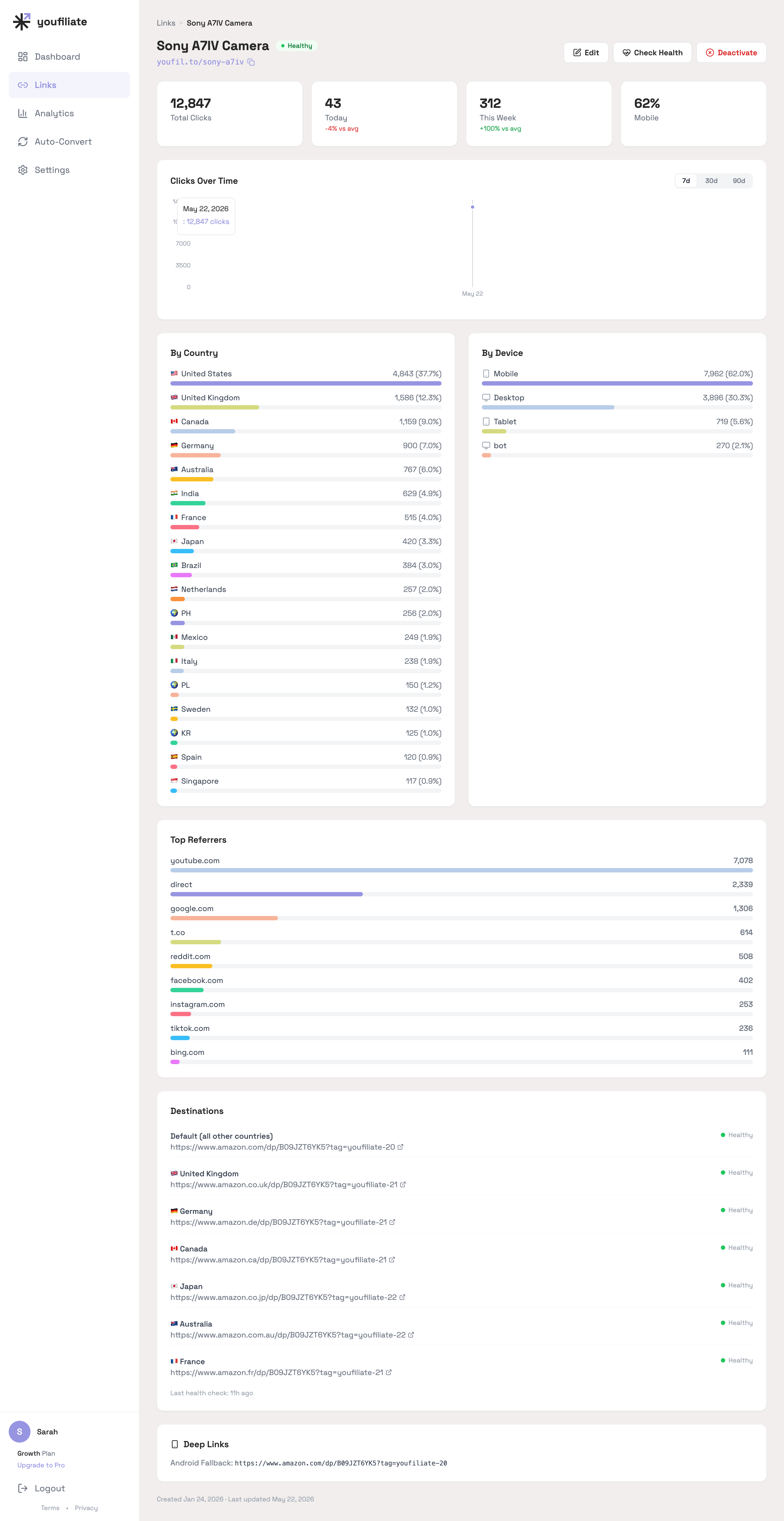
The fix is geo-targeted smart links. A smart link is a single short URL that detects the viewer’s country at click time and routes them to the correct local Amazon (or other merchant) storefront with your local affiliate tag attached. For a deeper conceptual primer, see how smart links work. The relevant point for pipeline builders: you mint these links programmatically — one API call per video.

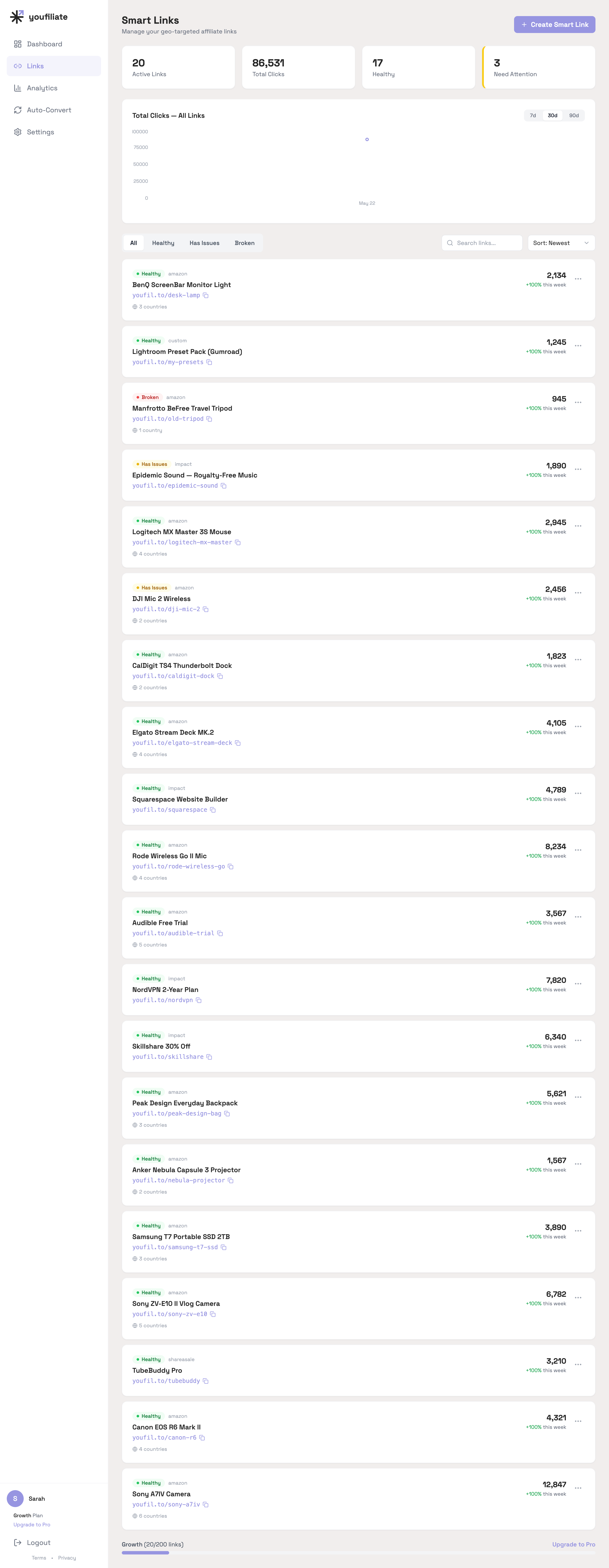
Youfiliate is a Smart Links platform for YouTube creators that turns any affiliate URL into a geo-targeted, app-opening smart link with a branded short URL (youfil.to). It health-checks every link on a rolling 7-day schedule so broken links in your back catalog don’t go unnoticed. It ships an MCP server you install with pip:

pip install youfiliate-mcp

If your orchestrator runs inside a Claude-powered agent (Claude Code, the Anthropic SDK agent loop, or any MCP-aware client), the Youfiliate MCP exposes tools like create_smart_link, add_geo_rule, and check_health directly to the agent. The agent calls them with no extra glue code.

For a non-agent pipeline that wants to use the MCP from a regular Python script, invoke it via the standard MCP client SDK:

from mcp import ClientSession
from mcp.client.stdio import stdio_client, StdioServerParameters

async def create_link_via_mcp(name: str, default_url: str) -> str:
    server = StdioServerParameters(
        command="youfiliate-mcp",
        env={"YOUFILIATE_API_KEY": YOUFILIATE_API_KEY},
    )
    async with stdio_client(server) as (read, write):
        async with ClientSession(read, write) as session:
            await session.initialize()
            result = await session.call_tool(
                "create_smart_link",
                {"name": name, "default_url": default_url},
            )
            return result.content[0].text  # short URL: youfil.to/slug

For most cron-triggered pipelines, the Youfiliate REST API is simpler than the MCP. One requests call:

import requests

def create_smart_link(
    name: str,
    default_url: str,
    geo_rules: list[dict] | None = None,
    auto_geo_rules: bool = False,
) -> str:
    resp = requests.post(
        "https://api.youfiliate.com/smart-links/",
        headers={"Authorization": f"Bearer {YOUFILIATE_API_KEY}"},
        json={
            "name": name,
            "default_url": default_url,
            "geo_rules": geo_rules or [],
            "auto_geo_rules": auto_geo_rules,
        },
    )
    resp.raise_for_status()
    return resp.json()["short_url"]  # e.g., https://youfil.to/sony-wh1000xm5

Wired into the pipeline:

def make_smart_link_for_video(script: Script, channel_config: dict) -> str:
    product = script.featured_product
    asin = lookup_asin(product, channel_config["amazon_program"])
    return create_smart_link(
        name=product,
        default_url=f"https://amazon.com/dp/{asin}?tag={channel_config['amazon_tag_us']}",
    )

The returned short_url (e.g., https://youfil.to/sony-wh1000xm5) replaces {smart_link} in the description template. That’s it. One function call between stage 7 and the actual upload.

Auto-generated geo rules for Amazon

Youfiliate detects when a default_url is an Amazon product link and auto-suggests geo rules for the six major Amazon markets (UK, DE, JP, CA, AU, FR) using the same ASIN. Pass auto_geo_rules=True to the create_smart_link() call above to accept the suggestions, or override per-country by passing your own geo_rules array. For the manual approach, see auto-localize Amazon affiliate links.

Deep linking for mobile viewers

Roughly 60% of YouTube viewing happens on mobile. Browser-based affiliate redirects on mobile kill conversion — the viewer has to tap through three pages, sign in to Amazon, and re-add the item to their cart. Youfiliate’s smart links detect mobile UA strings and open the merchant app directly via universal links (iOS) and intent URLs (Android). No additional code in your pipeline.

Health monitoring without manual auditing

For an automated channel publishing weekly, links break in the back catalog without anyone noticing. Amazon discontinues an ASIN, an affiliate program changes its URL format, and you keep losing clicks for months. Youfiliate health-checks every smart link on a 7-day rolling schedule and notifies you if any destination starts returning a 4xx or redirects to a non-product page. Run a free scan on an existing channel to see what’s already broken.

Flat-rate pricing matters at scale

The competing tool — Geniuslink, a per-click smart link router — charges $5 per 1,000 clicks. At 50,000 clicks/month (achievable for a channel doing 500K monthly views), Geniuslink runs ~$101/month. Youfiliate’s Pro plan is $49/month flat regardless of click volume. For an automated channel where the explicit goal is compounding traffic over time, the unit economics matter. The Geniuslink vs. flat-rate pricing comparison walks through the math at different scales. The broader smart links for affiliate marketing guide covers when each model makes sense.

Stage 9 — Scheduling, Orchestration, and the Analytics Feedback Loop

Scheduling options

Three reasonable choices:

  • bare cron — fine for a single-channel pipeline that runs once or twice a week. Zero dependencies. Hard to debug when it fails silently.
  • Celery Beat — the right answer for most Python-native pipelines, especially if you already run Celery for other workloads. Built-in retries, dead-letter handling, structured logging. This is what I run.
  • Prefect or Airflow — overkill for a sub-100-task DAG, but worth the complexity if you’re orchestrating dozens of channels and need a UI to inspect runs.

A minimal Celery Beat config:

from celery import Celery
from celery.schedules import crontab

app = Celery("youtube_pipeline", broker=REDIS_URL)

app.conf.beat_schedule = {
    "publish-monday": {
        "task": "pipeline.tasks.run_full_pipeline",
        "schedule": crontab(hour=14, minute=0, day_of_week=1),
        "kwargs": {"channel": "ai_tools_review"},
    },
    "publish-wednesday": {
        "task": "pipeline.tasks.run_full_pipeline",
        "schedule": crontab(hour=14, minute=0, day_of_week=3),
        "kwargs": {"channel": "ai_tools_review"},
    },
    "publish-friday": {
        "task": "pipeline.tasks.run_full_pipeline",
        "schedule": crontab(hour=14, minute=0, day_of_week=5),
        "kwargs": {"channel": "ai_tools_review"},
    },
}

Closing the loop with YouTube Analytics API

This is what separates an automated pipeline from a content firehose. After each video has been live for 7 days, query its performance and feed the numbers back into stage 1’s topic ranker.

from datetime import date, timedelta

def get_video_analytics(video_id: str) -> dict:
    creds = Credentials.from_authorized_user_file("token.json", [
        "https://www.googleapis.com/auth/yt-analytics.readonly"
    ])
    yt = build("youtubeAnalytics", "v2", credentials=creds)
    end = date.today()
    start = end - timedelta(days=365)
    resp = yt.reports().query(
        ids="channel==MINE",
        startDate=start.isoformat(),
        endDate=end.isoformat(),
        metrics="views,estimatedMinutesWatched,averageViewPercentage,subscribersGained",
        dimensions="video",
        filters=f"video=={video_id}",
    ).execute()
    return resp["rows"][0] if resp.get("rows") else {}

Stash the result in your DB along with the original topic metadata. After 20+ videos, you have enough data to bias topic selection toward the patterns that actually retain. Combine this with smart-link click data from Youfiliate’s /api/smart-links/{id}/stats/ endpoint to get true revenue-per-video attribution — not just views, but click-through to commission.

Logging and alerting

Wire structured logs through every stage with a single correlation ID per pipeline run. The pattern I use:

import structlog

log = structlog.get_logger()

def run_pipeline(topic: dict, channel: str) -> str:
    run_id = uuid4().hex[:12]
    bound = log.bind(run_id=run_id, channel=channel, topic=topic["title"])
    bound.info("pipeline.start")
    try:
        # ... stages ...
        bound.info("pipeline.complete", video_id=video_id)
    except Exception as e:
        bound.exception("pipeline.failed", stage=current_stage)
        notify_slack(f"Pipeline failed at {current_stage}: {e}")
        raise

Sentry catches the exceptions automatically; the Slack webhook gives you the human-readable summary.

Putting It All Together — The Orchestrator Script

Here’s the full wiring as a single function. Each stage is a one-liner because the work lives in the stage modules:

def run_pipeline(topic: dict, channel: str) -> str:
    cfg = load_channel_config(channel)
    work = Path(f"/tmp/pipeline/{uuid4().hex[:8]}")
    work.mkdir(parents=True, exist_ok=True)

    # Stage 2: Script
    raw_script = generate_script(topic, cfg)
    script = parse_script(raw_script)

    # Stage 3: Voiceover
    audio = generate_voiceover(script.clean_text, cfg["voice_id"], work)

    # Stage 4: Visuals
    clips = []
    for kw in script.broll_keywords:
        clips.extend(download_clips(fetch_broll(kw), work))

    # Stage 5: Assembly
    srt = generate_srt(audio, work / "captions.srt")
    video = assemble_video(clips, audio, work / "out.mp4", subtitles=srt)

    # Stage 6: Thumbnail
    thumb = generate_thumbnail(topic["title"], cfg["thumbnail_style"], work / "thumb.jpg")

    # Stage 8: Smart link (before upload, so we can put it in description)
    smart_link = create_smart_link(
        name=script.featured_product,
        default_url=f"https://amazon.com/dp/{lookup_asin(script.featured_product)}?tag={cfg['amazon_tag_us']}",
    )

    # Stage 7: Upload
    description = DESCRIPTION_TEMPLATE.format(
        hook=script.clean_text.split("\n")[0],
        product_name=script.featured_product,
        smart_link=smart_link,
        channel_handle=cfg["youtube_handle"],
        niche=cfg["niche"],
        chapters=generate_chapters(script),
    )
    video_id = upload_video(video, thumb, topic["title"], description, cfg["tags"])

    # Stage 9: Schedule analytics check
    schedule_analytics_pull.apply_async(args=[video_id], countdown=7 * 86400)
    return video_id

That’s the entire pipeline in 30 lines of orchestration. The complexity lives in each stage module where it belongs.

Frequently Asked Questions

How much does a fully automated YouTube pipeline cost per video?

A fully automated YouTube pipeline using stock footage costs roughly $0.20 per video at the API level. That breaks down to ~$0.02 for Claude script generation with prompt caching, ~$0.13 for ElevenLabs voiceover (5-minute video), $0 for stock footage from Pexels/Pixabay, $0 for FFmpeg assembly, ~$0.04 for a DALL-E 3 thumbnail, $0 for the YouTube upload itself, and $0 per smart link on the Youfiliate free or Starter plan. Three videos per week comes to under $10/month in variable API costs. Swap stock footage for AI-generated video via Runway and the cost rises to ~$1.70/video.

How do I automate a YouTube channel with Python?

Build the pipeline as nine stage modules: topic research, script generation, voiceover, visuals, FFmpeg assembly, thumbnail, upload, smart link creation, and analytics. Use the Anthropic SDK for scripts (with prompt caching), ElevenLabs for voiceover, Pexels/Pixabay for stock footage, FFmpeg via subprocess for assembly, Pillow + DALL-E 3 for thumbnails, google-api-python-client for upload, and the Youfiliate REST API or MCP server for affiliate smart links. Trigger the orchestrator on a Celery Beat schedule. The whole system fits in a single Python repo and runs on a $5/month VPS.

What APIs do I need to build an automated YouTube pipeline?

The minimum API set is six services: an LLM for scripts (Claude or GPT-4), ElevenLabs for voiceover, a stock footage provider (Pexels free tier works), an image generator for thumbnails (DALL-E 3 or Flux via Replicate), the YouTube Data API v3 for upload, and Youfiliate for geo-targeted smart links. Optional but useful: SerpAPI or DataForSEO for keyword data, Whisper (local, free) for captions, Runway ML for AI-generated visuals, and the YouTube Analytics API for the feedback loop. You can ship a working pipeline with as few as four API keys (Anthropic, ElevenLabs, YouTube, Youfiliate) plus FFmpeg installed locally.

Insert smart link creation between the assembly and upload stages. Mint the link via the Youfiliate REST API (POST https://api.youfiliate.com/smart-links/ with the product’s affiliate URL as the default_url) or the Youfiliate MCP server’s create_smart_link tool. The API returns a short URL like https://youfil.to/product-name that auto-routes viewers to their country’s local Amazon (or other merchant) storefront with the right affiliate tag. Substitute the short URL into your description template before calling YouTube’s videos.insert endpoint. One function call per video; no manual link audit required.

Yes — the Youfiliate MCP server is purpose-built for this. Install it with pip install youfiliate-mcp and your pipeline calls its create_smart_link tool either through a Claude-powered agent loop or directly via the Python MCP client SDK over stdio. The MCP exposes the same operations as the REST API (create, list, update, add geo rule, check health) but slots natively into agent-based orchestrators. If your pipeline is a regular cron-triggered Python script with no agent in the loop, the REST API is simpler. If it’s already inside Claude Code or an Anthropic SDK agent, the MCP is one less integration to write.

What is the Youfiliate MCP?

The Youfiliate MCP is an open-source Model Context Protocol server (pip install youfiliate-mcp, source on GitHub) that lets any MCP-aware AI agent — Claude Code, the Anthropic SDK agent loop, Cursor, or a custom orchestrator — create and manage Youfiliate smart links as native tool calls. It exposes create_smart_link, add_geo_rule, check_health, get_stats, and the rest of the Youfiliate API surface as MCP tools, so an agent can mint a geo-targeted affiliate link or audit a creator’s link health without any custom HTTP code. It’s authenticated with a single YOUFILIATE_API_KEY environment variable.

What’s the difference between the Youfiliate MCP and the REST API for pipeline use?

The MCP server is the better choice when your orchestrator already runs inside a Claude-powered agent (Claude Code, the Anthropic SDK agent loop, or any MCP-aware client) — the agent calls MCP tools without writing HTTP glue. The REST API is the better choice for standalone Python scripts and cron jobs because it’s a single requests.post() call with no client-session lifecycle to manage. Both expose the same operations: create smart link, add geo rule, fetch click stats, run health check. Pick based on what your runtime already looks like, not on feature parity.

Is automated YouTube content against YouTube’s Terms of Service?

No — automation itself is not banned by YouTube. YouTube’s spam policy targets “mass-produced and repetitive content” with no original value, not automation as a category. Channels that use AI for production but add original research, niche expertise, sourced data, or commentary are not in violation, and YouTube has confirmed this in its content guidelines. The practical guardrails: have a clear niche, source factual claims, write hooks that promise specific value, and disclose AI use where the content meaningfully relies on it. Pipelines that scrape Wikipedia, run it through TTS, and slap stock footage on top are the ones getting demonetized. Pipelines that use AI as a production tool for original editorial work are fine.

Can I run multiple YouTube channels from one pipeline?

Yes — parameterize niche, voice ID, thumbnail style, affiliate program, and YouTube credentials per channel in a YAML config, then have the scheduler call run_pipeline(topic, channel) with different channel arguments. Use separate Youfiliate API keys (or workspaces) per channel so click stats don’t cross-contaminate, and store each channel’s YouTube OAuth token.json in a separate secrets path. The same orchestrator code runs all channels; only the configs change. Practical limit before the YouTube Data API quota becomes a constraint: roughly 6 uploads per day on a default 10,000-unit daily quota. If any of your channels publish Shorts, the affiliate-link rules and placement are different — see affiliate links on YouTube Shorts.

Start Building

The pipeline above is a working blueprint, not a tutorial. Every code snippet is something you paste into a real project and adapt. The single highest-leverage thing you can add to your existing pipeline — if you already have stages 1–7 working — is stage 8: programmatic smart link creation. It’s the difference between leaving 30–50% of your affiliate revenue on the table and capturing it.

Start with 10 free smart links at youfiliate.com, or pip install youfiliate-mcp and wire it into your orchestrator in five minutes. The MCP source is on GitHub if you want to read it before installing. Either way, your pipeline finally has the monetization stage every other guide forgot.

Done reading? Try it yourself

Create a geo-targeted smart link in 60 seconds

Start Free — No Credit Card

10 smart links free forever. Unlimited clicks on every plan.

10 free smart links

Get 10 Free Smart Links